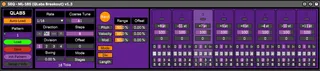
QL-185 - ML-185 Sequencer Reboot by QLabs
A reboot of the venerable ML-185 sequencer, originally creat...
- Type
- MIDI Effect
- Author
- qlabs
- Version
- 1.3
- License
- Attribution
- Live version
- 10.1.5
- Max version
- 7.3.5
- Downloads
- 4,531
- Updated
- 2021-09-20
QL-185 - ML-185 Sequencer Reboot by QLabs is a MIDI Effect for Ableton Live by qlabs, distributed as Creative Commons Attribution. It targets Live 10.1.5 and Max 7.3.5. On maxforlive.com it has 4,531 downloads. First published 2020-06-12, last updated 2021-09-20. 13 user comments below.
New to Max for Live? Read what MIDI Effects do, what the Attribution license means, how to install a device.
Description
A reboot of the venerable ML-185 sequencer, originally created by 3st on this very website.
The original ML-185 sequencer is my favorite sequencer of all time - the way it breaks free from the "steppy," boring, "doot-doot-doot..." sequencing paradigm is brilliant, and very straightforward to use in practice.
I decided performance-friendly pattern memory and inspiration-friendly randomization options would be essential additions, so here they are. Everything else is kept exactly as it was, save for the slightly compacted UI.
Additions:
•16-pattern preset storage w/ toggled auto-load (16 patterns chosen to allow comfortable use with CC knobs)
•Pattern randomization with toggles for each parameter and range selectors to affect the direction and spread of randomization
•Pattern initialize (affects all parameters)
•Offset control to jump around within a pattern as it plays
Cheers,
QLabs
Comments (13)
1. stage division doesnt work on my system
2. Clear functions dont work
ableton 10.1.9
Fixed mode runs for a fixed number of tickets...a bit confused why it's limited to say 4 stages for 16 ticks, which means that at times the sequencer will go back to stage 1 to fill up the remaining ticks until 16 is reached.
Can you add another mode, so that it continues onto subsequent stages (e.g. stage 5 and 6) to fill those needed ticks? i.e. it's not limited to the number of stages specified?
As for stages mode, I may have accidentally overlooked it in my process. I'll take another look at it shortly - thank you for the heads up!
Worked well for a couple of weeks and then all of a sudden the sequencer would freeze. If you restart the track if works again.
But now the random button has completely stopped working.
Shame, i really like this sequencer.