- Type
- MIDI Effect
- Author
- leisurewear
- Version
- 1.1.0
- License
- AttributionNonCommercialShareAlike
- Live version
- 11.3.2
- Max version
- 8.5.1
- Downloads
- 718
- Updated
- 2023-05-28
MIDI2Drum is a MIDI Effect for Ableton Live by leisurewear, distributed as Creative Commons Attribution-NonCommercial-ShareAlike. It targets Live 11.3.2 and Max 8.5.1. On maxforlive.com it has 718 downloads. First published 2021-06-26, last updated 2023-05-28. 2 user comments below.
New to Max for Live? Read what MIDI Effects do, what the AttributionNonCommercialShareAlike license means, how to install a device.
Description
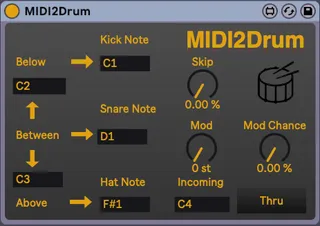
Convert any MIDI pattern into a MIDI pattern suitable for triggering Drums.
USAGE:
1. Set the two threshold values on the left side of the device.
2. Set the note values you would like to be triggered for Kick, Snare, and HiHat
3. Optionally set "Skip" probability - the probability that the incoming note will be skipped
4. Optionally set a "Mod" amount (in semitones) and the probability it will mod the incoming note by that amount - "Mod Chance"
5. Toggle each note on or off. Useful if you only want the kicks to pass through, for example.
Any incoming note that is below the "Low" threshold will trigger the "Kick Note".
Any incoming note that is between the "Low" and "High" thresholds will trigger the "Snare Note"
Any incoming note that is above the "High" threshold will trigger the "HiHat Note"
CHANGELOG:
* v1.0 - First public version
* v1.0.1 - Bug fix to prevent note-offs from triggering drum notes. Thank you @swiftmod!
* v1.0.2 - Minor UI improvements
* v.1.1.0 - Added on/off toggles for each note.
Comments (2)
Thanks for this device! Very nice!
I assume it is not intentional that the output notes also get triggered by note off messages of incoming notes!?
This can be annoying, but can bring some happy accidents as well... therefore I think it would be cool to have the option to turn note off triggering on/off !?!?
Best regards
I just updated the device to v1.0.1 which fixes that issue. I will add a feature for selecting to trigger note-offs in the future. For now, I think the general desired effect is to not trigger them.