- Type
- MIDI Effect
- Author
- yarhammer
- License
- AttributionNonCommercialShareAlike
- Live version
- 11
- Max version
- 8.1
- Downloads
- 0
- Updated
- 2026-02-24
yaNext8 is a MIDI Effect for Ableton Live by yarhammer, distributed as Creative Commons Attribution-NonCommercial-ShareAlike. It targets Live 11 and Max 8.1. First published 2021-06-26, last updated 2026-02-24. 2 user comments below.
New to Max for Live? Read what MIDI Effects do, what the AttributionNonCommercialShareAlike license means, how to install a device.
Description
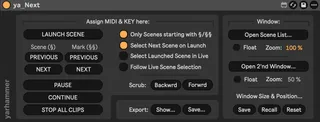
ya_Next, a second cue list for Ableton Live.
Whenever you need to stay in a pre defined scene order ("cue list") but also want to jump around… ya_Next keeps you in check.
It allows to build a cue list out of all scenes or just those starting with "§" in their name. This list is then presented in separate window (i.e. on a second monitor) and can be stepped thru with a single KEY/MIDI button (incl. select next scene on launch)… completely separate from what ever else happens in Live. The show goes on.
This device, like all ya_devices, has been created out of a special need many years ago and became an essential part of our show production process.
It's not for everyone but who needs it… needs it badly and will never go back to the scary days of a single scene list.
Njoy.
Version 6.2 now includes an improved window management that allows the position and size to be saved and recalled. Once saved it is also saved with the Live-Set and recalled automatically.
There has been a lot of updates to ya_Next.
Check out the v8 beta here:
https://gum.new/gum/cmlvfr6g3001g04ji03567hg9
Comments (2)
very handy and the GUI is nice also.
some features I wish were implanted.
1. organize the scenes play order
2. change the text size and color
3. make it also available to the arrangement view
the fontsize could be changed with the "window size" which, until now, was hidden in the about screen (clicking the yarhammer logo). As of the new version 6.2 the window management has been moved to the main device view. Check it out.
Cheers,
Y.