- Type
- MIDI Effect
- Author
- leisurewear
- Version
- 1.2.1
- License
- AttributionNonCommercialShareAlike
- Live version
- 11.2.11
- Max version
- 8.5.2
- Downloads
- 1,182
- Updated
- 2023-04-27
Haste is a MIDI Effect for Ableton Live by leisurewear, distributed as Creative Commons Attribution-NonCommercial-ShareAlike. It targets Live 11.2.11 and Max 8.5.2. On maxforlive.com it has 1,182 downloads. First published 2021-07-03, last updated 2023-04-27. 25 user comments below.
New to Max for Live? Read what MIDI Effects do, what the AttributionNonCommercialShareAlike license means, how to install a device.
Description
Repeat MIDI notes at a rate that accelerates (or decelerates) between two note values over a time interval.
USAGE:
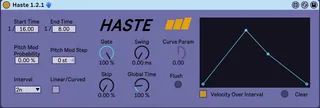
1. Set Start Time and End Time. These values are divisions of a measure (not necessarily the Interval chosen). Note that you can choose any decimal number in the denominator for each of these values and you are not restricted to the typical 1/4, 1/8 plus dotted/triplet values (or alternatively milliseconds) that you are accustomed to.
2. Set Interval. This is the time interval over which we will accelerate between Start and End times.
3. Turn On/Off Linear/Curved. This determines whether the device will generate notes based on a linear or curved line.
4. Optionally set Curve Param. If Linear/Curved is set to ON, this determines the shape of the curve. Positive values generate notes based on a logarithmic line shape while negative values generate based on an exponential line shape. If this is parameter is set to 0, it will work identically to having Linear/Curved set to OFF.
Note that this parameter is disabled while Linear/Curved is set to OFF.
5. Optionally set Gate. This will shorten the notes output by a factor of 0-100%.
6. Optionally set Pitch Mod Step and Pitch Mod. This will pitch shift the notes output by the value set by Pitch Mod Step based on the probability set by Pitch Mod. For example, values of +1st and 33% gives you a 33% chance that each note generated will be shifted up 1 semitone.
7. Optionally set Swing. This will swing the notes output by this value in milliseconds.
8. Optionally set Skip. This determines the probability of skipping any given note being generated by the device
9. Create a clip and add some MIDI notes (preferably as long as your Interval). Notes will be output for as long as the input MIDI note is held and will end on note-off or when transport stops.
10. If you want to run the current pattern at double or half of the current Interval (or any other % value), set the Global Time to 200% (twice as fast) or 50% (half as fast). Keep in mind you might need to update your MIDI pattern to accommodate the time changes you make with this setting - i.e. half or double the length of the MIDI note.
SUGGESTED USE:
* This was originally designed to generate unique rhythmic patterns, so use with a Drum Rack is recommended but not required. Any MIDI instrument will work.
* Place a Haste instance before a Drum Rack and offset input notes for each drum sound to generate unique rhythms.
* Alternatively, place an instance of Haste on individual drums and customize the settings for each voice to generate even stranger rhythms.
* You can choose the same value for Start and End and simply use it as a repeater for unique note lengths like 1/6.66 or 1/4.20
DEMO VIDEO:
https://www.youtube.com/watch?v=bbsfvU1P7w0
CHANGELOG
1.2.1:
* UI revamp
* Added velocity line function. Draw a line and Haste will map the values to the velocities of the notes output over the selected interval. Or switch it off and Haste will output a fixed velocity based on the input note.
1.2.0:
* Added Linear/Curved, Curve Param, and Skip settings. See descriptions above.
* Changed parameter labels: "Pitch Mod" is now "Pitch Mod Step" and "Mod Prob" is now "Pitch Mod"
* Changed Pitch Mod step values. Now allows for negative step values. Total range is -12st to 12st.
* UI / layout update to accommodate new settings
NOTE:
If you like the device and find it useful, consider tossing me a few bucks via the Gumroad link below. Included there is a bonus rack for Live 11 users that has some great snapshot presets to get you going.
Comments (25)
Also I think you intended to make the "URL (optional)" above go to https://leisurewear.gumroad.com/l/VrUwo (no "edit" at the end)
Yeah, it can feel like a bouncing ball depending on how you configure it. It can also feel quite a bit different as it has a lot of range in terms of its output.
I'm working on a video demo for it today so I'll link here when it's finished.
https://www.youtube.com/watch?v=bbsfvU1P7w0
Sadly I am on 11.0.5 and not getting any love either. Nothing seems to pass through haste.
Cheers!
One recommendation I have for future videos is to increase the loudness of your voice, or lower the audio/music loudness, since it was hard to hear you narrate at times.
I think Haste could solve a problem I have with making sequences that need to get rather zippy, I've got to take it to extreme values.
Going to buy Haste now, thank you for creating this tool...
(1) End Time could be set to higher than "127.00"
(2) Internal can be set to span a longer time than ".5n"
Say for example I want to have a very gradual acceleration happen over the course of 32 bars. If there's a way to do that currently that I'm missing, let me know.
WAY TO GO!!!
I'm on 11.0.5b6 and it's working for me, worked out-of-the-box.
Glad to hear it's working for you and thanks again for your support! You'll receive a notice from Gumroad when I push out the next version.
Thank you for your help in improving this device!
Global Time is working as expected for me, YES this is what I envisioned! Increased End Time to 256.00 is also useful, thank you.
The UI is still pretty compact and clean, though one oddity: Gate, Mod Prob, and swing all have a "lilac" color filling in the knob ring when they're at 0.00%. Global Time's knob colors are different and harder to see.
Other ideas that come to mind:
(1) Would be cool to have a way to adjust the "curve bias" (similar to other models where you can make a curve more "logarithmic" or "exponential")
(2) Adding in controls for velocity (so that it can fade in/out as it hastens) would add more expressivity, too.
Good to hear you're liking it!
I've been working on the curved vs. linear acceleration for a little while. It's coming eventually.
I'll play around with some velocity modding too.
Thanks for the suggestions.
Any progress on velocity modding? Would be real effective to be able to fade out a "bouncing ball"-type effect to silence, or make it increase in velocity as an intensifying transition effect.
Right now I'm working around that by freezing the output that Haste generates, then applying Ableton audio clip fades, or filter automation. I even have a recurring chain with XLN Audio's RC-20 so it can sound like something is hastening from a distance, then approaching closer and closer. :)