- Type
- MIDI Effect
- Author
- Gross9978
- Version
- 41.3
- License
- AttributionNonCommercialShareAlike
- Live version
- 12.1
- Max version
- 9
- Downloads
- 1,167
- Updated
- 2024-11-05
MultiSEQ is a MIDI Effect for Ableton Live by Gross9978, distributed as Creative Commons Attribution-NonCommercial-ShareAlike. It targets Live 12.1 and Max 9. On maxforlive.com it has 1,167 downloads. First published 2022-07-22, last updated 2024-11-05. 4 user comments below.
New to Max for Live? Read what MIDI Effects do, what the AttributionNonCommercialShareAlike license means, how to install a device.
Description
1.3 Added a Device setting to the Send/Receive so multiple Seqs can be used at the same time.
Just Make sure "D" matches on each device.
1.2
-Sequencers retain values when resizing
1.1
---Changed the Scale system to work better with Live 12, instead of Chromatic it can now just be turned off by clicking Scale.
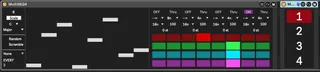
MultiSEQ4 is an up to 32 step sequencer with 4 playheads. Each playhead has independent direction, rate, note length, velocity, duration, transposition and gate. The playheads can be routed to the same track or another track with the included receiver in any combination.
The main sequence can be randomized and or scrambled manually or every nth pass.
It has Scale Quantizing with all available scales from Ableton.
Most of the controls can be used with Push2
-Ableton 11 only-
The scale will stay in sync bidirectionally with the current scale chosen in Live via a Push2 or a midi clip.
I believe everything else will work with any version.
If anyone has any suggestions or tips id love to hear them.Thanks
Comments (4)
The Random switches can be made to be fake momentary switches for the push2 knobs - you just have to to a flip flop and set the state of the button.
One thing that would be a really nice addition is if the step number would be something that can be mapped. Changing the Step number live on drums is great for raising the energy in a build up, but doing that with a mouse looking at the screen is really a no-go.
Maybe something to think about :)
I also noticed that changing the step number from long to short and then back again erases the pattern of the steps that were in the shortened section. That poses a problem for that workflow as well :/
Also it seems to me that settings are often lost on both the sequencer and the receiver. Always when reloading the set, but sometimes also during one session if it hasn't been used a while or has been turned off for a bit. Might be a bug.
Otherwise great effort, I also quit dig the look :)
Cheers Tom