- Type
- MIDI Effect
- Author
- Gross9978
- Version
- 1.5
- License
- AttributionNonCommercialShareAlike
- Live version
- 11.1.6
- Max version
- 8.3.1
- Downloads
- 1,495
- Updated
- 2025-01-13
DropSEQ is a MIDI Effect for Ableton Live by Gross9978, distributed as Creative Commons Attribution-NonCommercial-ShareAlike. It targets Live 11.1.6 and Max 8.3.1. On maxforlive.com it has 1,495 downloads. First published 2022-07-25, last updated 2025-01-13. 12 user comments below.
New to Max for Live? Read what MIDI Effects do, what the AttributionNonCommercialShareAlike license means, how to install a device.
Description
1.5 Added checks for switching in and out of session mode on Push, renamed a few things. By default it should be ready for Push3 after loading so pressing shift/select at the same time should Grab control of the device.
1.4 bug fix, should now correctly save with the live set.
1.3- Should now work with Push3 Standalone. I don't own one to test on but everything is controllable fully from the controller version so it should work to the best of my knowledge. Once loaded there's a setup page that should be self explanatory, on the right side are "resync" and "active" switches, above the switch is a reminder of what buttons on Push controls this so you don't have to constantly navigate to this page.
Thanks to Isotonik Studios for some examples on using Push3 standalone, surely you know who that is but if not check them out!
1.2
-Works with Push 2 and 3
-Changed the Scale system to work better with Live 12, instead of Chromatic it can now just be turned off by clicking Scale.
-On off buttons on Push now reflect the same buttons on the device.
-Changing tracks in Live will release Push control and keep the Active setting when the track is reselected.
issue- Active occasionally needs to be pressed more than once for the device to be displayed on Push.
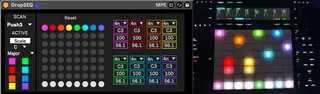
DropSEQ is an 8 Lane sequencer where each lane has an independent Rate, Note, Velocity and Duration. It's meant to be played from a Push2 but can also be used standalone, it just loses some of the playability.
Each lane has a start point chosen by either the onscreen grid or Push2 button matrix. When it hits the bottom white strip the note is played. It can be placed while running or stopped. If placed while running it will overwrite the countdown happening and start the countdown over from the new start point.
Global transport controls whether the sequences are playing but they don't restart with the transport, they just continue dropping based on whenever they were placed until either the start point is changed or Reset is pressed. Pressing Reset or the Push2s UpArrow will start each lane over at the current start point at the same time.
Each lane can be turned On/Off using the buttons on the left or the Push2s Scene Launch Buttons. When turned off it continues the countdown silently and when turned back on will pickup wherever it would have been if never turned off.
It has all of the scales included with Ableton.
_Live 11.1_
The scales will stay in sync bidirectionally with a Push2 or midi clip.
Except for the scale syncing I believe everything else will work on older versions of Live.
I got the basic technique for the Push2 integration form a MusicHackSpace video by Mark Towers, if you're interested in this kind of stuff I highly recommend their courses.
If you're using a different grid controller like a launchpad this could be pretty easily modified to work with one of those as well. If you go to do it and my messy patching makes it impossible feel free to hit me up haha
Any tips or suggestions are always welcome-Thanks
Comments (12)
But it doesn't seem to be passing any midi to the instrument(s). No sound whatsoever.
What am I missing?
Sadly, though, for me the descending notes do not show up on the Push 2. The other controls work fine, just nothing on the 8x8 buttons.
This is with Live 11.1.6.
btw i bet @verdurin forgot to press ACTIVE to take over the push2 matrix