- Type
- Audio Effect
- Author
- OspreyInstruments
- Version
- 1.0
- License
- None
- Live version
- 10.1.18
- Max version
- 8.1.5
- Downloads
- 0
- Updated
- No Updates
LoFi is an Audio Effect for Ableton Live by OspreyInstruments, distributed as freeware, with no license specified by the author. It targets Live 10.1.18 and Max 8.1.5. Published 2023-06-20. 19 user comments below.
New to Max for Live? Read what Audio Effects do, how device licenses work, how to install a device.
Description
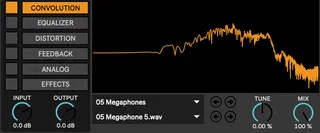
LoFi provides a pallet for all things dirt. The primary tenant of this device is the impulse response library (some my own, some scavenged) of a vast array of speakers, radios, megaphones, microphones, and electronics. This can be tuned, and further sculpted with the subsequent equalizer.
See linked page for more details :)
Comments (19)
The rest of the plugin is great, but would love to get the IR's working!
Im on ableton 11.2, MB Pro M1
I'm a "rainbow noise" enthusiast, so always keeping my ears out for something like this.
Have you thought of a randomization feature? 🎲
Keep clicking for surprises. It'd be very useful with all the options you've provided. And some more example presets to boot.
Ableton 11.3.3, Macbook M1 Pro
Unfortunately I'm having the same problem...I've tried to install it following the instructions step by step, in every possible "max for live" folder in my user library, but no luck. No sound at all using the convolution strip, and with the analog one (I think for the same reason, since they both work with the IRs) no response from the noise.
Macbook pro M2 Max, Ventura 13.2.1
Yes there was some problems with the load sequence it turns out, and the IR and sample libraries weren't loading correctly. It's my first time taking this approach of "auto scanning" these relative directories, and there was some unforeseen challenges.
I posted an update that should hopefully fix it for everyone. There is a separate LoFi.amxd file outside of the archive that you can download and replace the original with, so you don't have to redownload the libraries. Please let me know if you are having problems though still after this update!
Your M4L user library is pointing towards an external drive? Or your other ableton libraries? Sorry, yes the file path thing is super finicky, and I'm still building a picture of what does and doesn't work for different people.
Did you install Java then? I finally had a breakthrough on this one. There was a single mxj object I'd used for processing one of the IR buffers (and totally forgot about). This one object does require java it turns out... not something I realized at first because I'd already had java installed.
https://cycling74.s3.amazonaws.com/support/java_install.html
This is the cycling 74 page that points towards the java download. Theres an M1 (arm) version that you'd use in your case. I'll add a note to the instructions regarding the java prompt, I know it scares a lot of people to be asked to install it. Maybe I'll come up with an alternative way to perform this process without using a mxj block.
I did hit the Java page you mentioned, but didn’t install. I wanted to hear back from you first, thank you for responding. I will install the Java. Yes I put my User Library on an external because I hate filling up my system drive. No worries sir, I’m patient, I know you’ll figure out another way but yes I’ll install the Java from the Cycling site and give that a try. Thank you
You still do need java unfortunately. There's no easy way I could think of to split the stereo buffer besides a java based buffer operations object :s