a better search for max devices
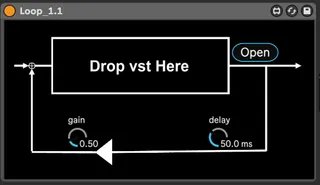
Loop screenshot

Loop

by fendoap

Free distribution for now: Load vst and create a sim...

View on maxforlive.com Website

Type
Audio Effect
Author
fendoap
Version
1.0
License
Attribution
Live version
10.1.18
Max version
8.1.5
Downloads
0
Updated
2023-06-18

Description

Free distribution for now:

Load vst and create a simple feedback loop.

Some vsts are not supported.

For experiments, harsh noises, etc.

Note) This is a test version, so there may be bugs.

-fendoap

Comments (5)

  • irishmos · June 18 2023
    Not one vst, vst3 or AU dropped into this loaded. Nothing....Ableton stock plugs as well. Live 10 Suite 10.1.4. Catalina OS iMac
  • fendoap · June 19 2023
    Hi! drop vst cannot be dropped from ableton. Drop it from a file folder, etc. I Changed into load button because of confusion. In addition, since it is a simplified version using the vst ~ object of max, there are many vsts that do not support it.
  • irishmos · June 19 2023
    Hi. Ok so it works now. And I think it's a great idea. Especially with a limiter after it. Valhalla Supermassive was quite interesting. If there is some way you can get it to drag from the browser, it would be 100% cooler. I just had a glitch up with the load button LOL. I wanted to use a LFO on supermassive. But I hit the open button and it lfo'd that off n on and I could only escape with FORCE QUIT lmfao. So that's a lil something to consider. If the open button was an open/close so the loaded plugin stayed accessible it would be very good. This could end up being a great experimental tool. I have been messing around with feedback loops in ableton and this is a great alternate way to achieve it.
  • fendoap · June 20 2023
    Thanks! It's still just a prototype of an idea (hence the free distribution), but I feel like this idea seems an interesting direction.
  • dekmantel · July 21 2023
    excellent idea. works very nicely with pitch shifters as well

← Back to search