Midi Bang v1.2 - midi note trigger
Midi Bang v1.2 (Upraded version of Midi Bang v1.1) Mi...
- Type
- MIDI Effect
- Author
- francois
- Version
- 1.2
- License
- None
- Live version
- 11.3.25
- Max version
- 8.5.8
- Downloads
- 422
- Updated
- 2024-05-18
Midi Bang v1.2 - midi note trigger is a MIDI Effect for Ableton Live by francois, distributed as freeware, with no license specified by the author. It targets Live 11.3.25 and Max 8.5.8. On maxforlive.com it has 422 downloads. Published 2024-05-18. 4 user comments below.
New to Max for Live? Read what MIDI Effects do, how device licenses work, how to install a device.
Description
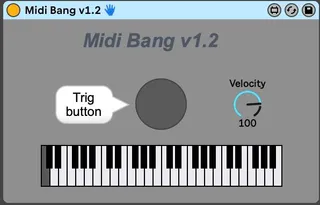
Midi Bang v1.2 (Upraded version of Midi Bang v1.1)
Midi note triggered with an audio signal
This device allows to trig a midi note with audio signal in (almost) real time (2ms latency). You can also link the velocity of the sent midi note with the level of the audio trigger.
To use it :
- Put one envelope follower (audio device) on the audio track you want to use to trig the midi note (put 30dB gain)
- Put the Midi Bang device on midi track and map the envelope follower to his button.
- On the midi track, put the sample you want to be triggered (sampler, drum rack etc)
If you want to link the velocity of the midi note to the level of the triggered note : (default velocity is 100)
- Put another envelope follower (audio device) after the first one and map it on the Midi Bang velocity pot. (put 12dB gain).
Good to know :
- You can choose the triggered midi note with a click on the keyboard
- The threshold required to trig the midi note is 50 so you have to adjust the gain of the first envelope follower (who control the trig).
- To control the velocity of the note you have to find the sweet spot between the gain of the second envelope follower (who control the velocity)
- If you want to reduce the latency between the audio signal and the triggered midi note you have to put the Ableton audio buffer at the minimum
(If you have some questions, suggestions let me know in a comment)
Enjoy !
Comments (4)
-mapping unsuccessful. the selected parameter doesnt support this operation
on midi track i have a wavetable
Je me suis inspiré de ton midi bang v1.2 pour en faire une version 16 trigger.
Merci pour ton inspiration :)
https://maxforlive.com/library/device/11357/16notestrigger
Merci à toi pour le device et pour le petit mot !