ABLETON SECRET TIN
ABLETON SECRET TIN is a Max for Live application for interac...
- Type
- MIDI Effect
- Author
- OSTINSOLO
- Version
- 1.1
- License
- AttributionShareAlike
- Live version
- 11
- Max version
- 8.1.5
- Downloads
- 0
- Updated
- 2026-04-18
ABLETON SECRET TIN is a MIDI Effect for Ableton Live by OSTINSOLO, distributed as Creative Commons Attribution-ShareAlike. It targets Live 11 and Max 8.1.5. First published 2024-05-23, last updated 2026-04-18. 4 user comments below.
New to Max for Live? Read what MIDI Effects do, what the AttributionShareAlike license means, how to install a device.
Description
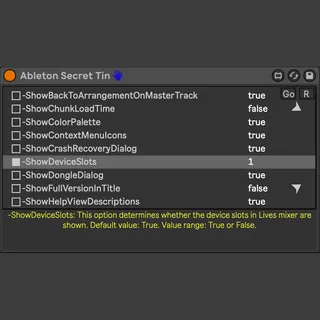
ABLETON SECRET TIN is a Max for Live application for interacting with the Options.txt file of Ableton Live. It provides access to some experimental and unsupported options of Live. Please note, that these options are undocumented and can disappear or change in future Ableton releases without any notification from their developers.
This release includes the latest additions to the Options.txt file for Ableton Live 12, as well as it supports Ableton Live 11.
Description
R - resets all previously set options.
Set - writes all options that are marked with [ ] selector at the beginning of each row.
Feel free to test what options still work in order to improve descriptions. You also may want to edit the device yourself: unfreeze it, open the patch, double-click the GUI, and modify the defaultValue values directly.
This is an experimental release and no technical support is included. It was also created as a practical JavaScript experiment for users interested in studying and extending Max for Live code.
This tool is released under a ShareAlike licence. If you modify it or create derivative versions, you must clearly credit Ostin Solo and VSTOPIA, including these websites:
ostinsolo.co.uk
vstopia.com
Any derivative must keep the same attribution and remain under the same licence terms.
Offers are appreciated. Skilled coders interested in collaborating on future projects are welcome to get in touch.
Comments (4)
It doesn't seem to work... but it erased every Options.txt content for every Live version on my system.
Thank you to give it a try, yet if you click on the R it resets all the options.
The left toggles enable the options you need then click go and all is back in place ;)
Please also for other users share the options you normally use and your Ableton version so your feedback gets useful.