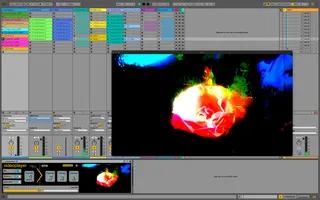
videoplayer for Ableton Live
videoplayer is a Max for Live device that provides a very ea...
- Type
- MIDI Effect
- Author
- StructureVoid
- Version
- 1.0
- License
- AttributionNonCommercialShareAlike
- Live version
- 11
- Max version
- 8.6.2
- Downloads
- 2,412
- Updated
- 2024-05-29
videoplayer for Ableton Live is a MIDI Effect for Ableton Live by StructureVoid, distributed as Creative Commons Attribution-NonCommercial-ShareAlike. It targets Live 11 and Max 8.6.2. On maxforlive.com it has 2,412 downloads. Published 2024-05-29.
New to Max for Live? Read what MIDI Effects do, what the AttributionNonCommercialShareAlike license means, how to install a device.
Description
videoplayer is a Max for Live device that provides a very easy way to display video files in an external window during your live performances, simply by triggering MIDI clips.
▶️ Watch our videos on how to use it and creative ideas here : https://www.youtube.com/playlist?list=PL1jAw-VM7x1abgF1rQ3ZQrNxescCLLAnt
By inserting this device in a MIDI Track, you will be able to launch videos simply by triggering clips you previously named with the video filename (video01.mov).
You want to loop the video ? Simply add the string "_LOOP" after the video name (video01.mov_LOOP), for example) and that's it.
This device also provides a small triple FX engine (Blur > Temporal Slide FX > Brightness/Contrast/Saturation).
Since you are inside Ableton Live, you can use its powerful tools to control and modulate the videoplayer parameters :
- by assigning them to a MIDI controller.
- by drawing envelopes in MIDI clips.
- by assigning them to modulators such as a LFO or an Envelope Follower.
Minimum requirements: Ableton Live 11 or 12 Suite or Standard with Max for Live installed.