Gain staging
***after download, load it on your session and follow instru...
- Type
- Audio Effect
- Author
- vair
- Version
- 1.0
- License
- AttributionShareAlike
- Live version
- 12.0.5
- Max version
- 8.6.2
- Downloads
- 0
- Updated
- 2024-08-08
Gain staging is an Audio Effect for Ableton Live by vair, distributed as Creative Commons Attribution-ShareAlike. It targets Live 12.0.5 and Max 8.6.2. First published 2024-08-07, last updated 2024-08-08.
New to Max for Live? Read what Audio Effects do, what the AttributionShareAlike license means, how to install a device.
Description
***after download, load it on your session and follow instructions to load the correct path to "Gain.adg" file. ***
Ok.. so this one is a bit trickier but without a doubt the patch I use the most daily.
Use it to manage gain staging in a session :
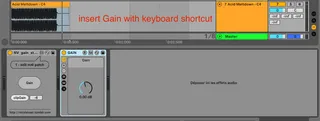
1 - at track level - map to keyboard shortcut to insert a gain anywhere in your session
2 - at clip level - map to keyboard shortcut to apply gain to a clip
1 - TRACK GAIN
- Trigger anywhere to add a gain in your plugin chain.
- If your fader is at -5, click on fader then trigger, a gain with -5 is added as last object of track and fader reset to 0. If last object was already a gain, then values are summed. (This works ok until +/-24 dB then it behaves weird.)
I created this because I use my faders only for automation and/or temporary adjustments (like voice at +6 dB while editing vocals). Waay more space for your brain to focus on what matters.
2 - CLIP GAIN
- Select a clip then trigger to apply gain.
There are a lot of M4L devices for clip gain, I wanted one as simple as possible when editing breath.
I use "e" as keyboard shortcut so I have "cmd+e" to cut, "e" to clip gain.
Collaboration is welcome but the device is available for free. No need to put a real email.
Find my other devices here
https://nicolasvair.tumblr.com/post/733477909092810752/max-4-live-devices