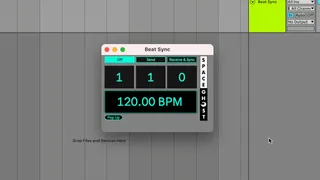
Beat Sync
Beat Sync is a Max for Live device built for redundant playb...
- Type
- MIDI Effect
- Author
- SpaceGhost
- Version
- 1.1
- License
- None
- Live version
- 11.3.30
- Max version
- 8.5.8
- Downloads
- 1
- Updated
- 2026-04-03
Beat Sync is a MIDI Effect for Ableton Live by SpaceGhost, distributed as freeware, with no license specified by the author. It targets Live 11.3.30 and Max 8.5.8. On maxforlive.com it has 1 downloads. First published 2024-09-25, last updated 2026-04-03.
New to Max for Live? Read what MIDI Effects do, how device licenses work, how to install a device.
Description
Beat Sync is a Max for Live device built for redundant playback systems, ensuring seamless synchronization between a main and backup computer running Ableton Live.
It allows for real-time, bi-directional re-synchronization on the fly If one computer fails during a critical moment in a performance.
Additionally, it provides clear visual tempo cues, helping operators or musicians stay on track during complex live sets.
Setup Steps:
1. Connect both computers via a MIDI network.
2. Insert Beat Sync on a MIDI track and assign the I/O to the appropriate MIDI network session.
3. Apply a track delay of approximately -35 ms to compensate for internal delay (this may vary based on CPU performance). Test by listening to both computers' clicks after triggering sync and fine-tune as needed.
4. On the main computer, enable the "Send" option.
5. On the backup computer, enable the "Receive & Sync" option.
6. Position the backup playhead slightly ahead of the main computer.
7. The backup will start automatically once the main computer reaches the same position and outputs the matching bar number.
For bi-directional syncing, ensure both computers have the same settings.
Youtube Tutorial: https://youtu.be/MpjljcMwFsE