- Type
- Audio Effect
- Author
- neshama
- Version
- 1.0
- License
- None
- Live version
- 12.1
- Max version
- 8.6.4
- Downloads
- 0
- Updated
- No Updates
Comb is an Audio Effect for Ableton Live by neshama, distributed as freeware, with no license specified by the author. It targets Live 12.1 and Max 8.6.4. Published 2024-10-16. 2 user comments below.
New to Max for Live? Read what Audio Effects do, how device licenses work, how to install a device.
Description
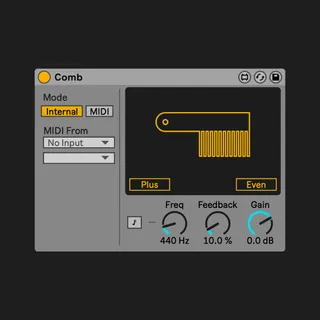
Comb 1.0: A free Max For Live Comb filter.
-
This Max for Live device was created out of the need for a simple comb filter.
A comb filter is essentially a very fast, single-tap delay.
When viewed through a spectroscope, it resembles the teeth of a comb. -Hence the name.
-
Comb offers two different polarity modes:
-'Plus' (Feedback) mode, which applies a delay feedback loop.
-'Minus' (Feedforward) mode, where the delayed signal is added to the dry signal.
Additionally, this filter features an Even/Odd control, which flips the phase of the delayed signal, leaving only the odd harmonics. (While it's more complex than this, it effectively achieves the desired result.)
The comb filter's frequency can be adjusted through Freq/Note for convenience. Enabling MIDI External allows the user to control the comb note via MIDI.
-
Comb is provided under a Creative Commons license.
You are free to use it for personal and creative projects.
However, please note that it is not for resale or republishing.
-
Made by Daniel Neshama Itach, 2024
@_neshama
jsui by Théophile Clet
https://tflcl.xyz
@hayon_music
Comments (2)
At zero, there is no amplification of the added signal- therefore dry.