Empires - risers and drops designer - full
I got tired of spending all that time making white noise bas...
- Type
- Audio Effect
- Author
- nelgabriel
- Version
- 1.01.0
- License
- None
- Live version
- 12.0.5
- Max version
- 9.0.2
- Downloads
- 594
- Updated
- 2024-12-19
Empires - risers and drops designer - full is an Audio Effect for Ableton Live by nelgabriel, distributed as freeware, with no license specified by the author. It targets Live 12.0.5 and Max 9.0.2. On maxforlive.com it has 594 downloads. Published 2024-12-19. 9 user comments below.
New to Max for Live? Read what Audio Effects do, how device licenses work, how to install a device.
Description
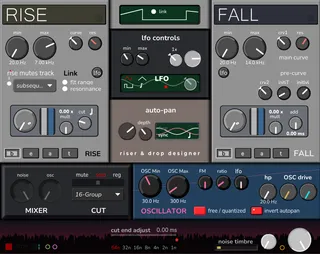
I got tired of spending all that time making white noise based risers and drops, so I've made that very useful white noise risers & drops generator.
the two large buttons allow you to start risers and drops
the "link" button on the display in between will make the drop start when the riser end.
the drop and riser controls are below (yellow and blue panels)
RISER key control
"cut" will end the riser before the end of the next bar (if linked, the drop will start at the beginning of the next bar as expected)
you can choose if the cut only affects the sound of the plugin or mute the entire ableton track
DROP key control
the lower smaller knobs control a "pre-ramp" before the main ramp, to create some kind of an attack in the first few ms of the drop, this may be refined in the full version
C and D key will start risers and drops
I forgot which one I set but there's a C/D pair that start the processes instantly, and an octave below, they start the processes in sync with ableton
the "b e a t" buttons below the rise/fall main button determine on which quarter note in the bar the process will start. if linked, the drop "b e a t" buttons have no incidence.
Select length separately for risers and drops
Select frenquency start & end separately
most controls are independent
LFO Modulation (one LFO, independently assignable)
Sync'd to ableton
"Cut" feature can cut the riser before the end at the plugin level or ableton track level (automated track mute)
Autopan feature
You can select a track in ableton that can be muted during the rise process
You can also select another track in ableton to be solo'd during the cut process
there's lots of controls, I'd do a video manual but I won't be able to until january 25
Comments (9)
I’m guessing there’s missing elements in the version of max that is running on Ableton 10.
It may work on 11, but I’m doubtful.
Did you manage to have the demo version work ?
the gui loads, but no sound. i tried in arrangement and session view, with and without midi and playback running. I also tried the demo version and that one has the same issue on my end. i am running ableton 12 on windows but maybe the problem is that i have max 8.6 and need to update. i will try that soon and get back to you!
Installed and works on Ableton 12, no problem.
Some fixes I'd like see patched and possible changes/additions:
[FIX]
▫ If the 'Res' dial on either RISE/FALL is turned down all the way, your blasted with full noise.
Raising the default dial value would probably help.
▫ There's a difference in volume when using the sliders with each "noise"
The FALL slider has to be 50% lower to match the RISE
▫ The FALL pre-curve initlvl dail needs raising (to roughly 3 o'clock) to match where the RISE frequency ends.
Thus making the transition smoother
▫ The 'link' button needs an outline.
▫ Small click happens on the FALL when 'res' is turned up.
▫ The beat counter at the bottom clips out the plugin (and the text isn't centred)
▫ A definitive visual way to tell if the free/quantized button is enabled (instead of the small white dot)
▫ Make double clicking the FM & Ratio dial default to zero.
[ADD/CHANGE]
▫ Would like to see some colour presets or a way to choose your own looks.
▫ Ability to change size of plug-in (It's a little small for me)
▫ 'Snap to Key/Note' function for the 'OSC'
▫ Short Release/attack for the RISE/FALL ending/beginning, as make transition fx smoother.
▫ Not sure the two circle buttons next to the beat counter are necessary (because you just click the RISE/FALL ones)
▫ 'Invert autopan' button in auto-pan section
▫ Link button for OSC Drive
▫ Some dials need labelling IMO
Sorry if some things I have said don't make sense.
Nevertheless, great work and hope to see more stuff from you.