- Type
- MIDI Effect
- Author
- uranai
- Version
- 1.3
- License
- AttributionShareAlike
- Live version
- 12.0.5
- Max version
- 8.6.2
- Downloads
- 718
- Updated
- 2026-03-14
Chord Play is a MIDI Effect for Ableton Live by uranai, distributed as Creative Commons Attribution-ShareAlike. It targets Live 12.0.5 and Max 8.6.2. On maxforlive.com it has 718 downloads. First published 2025-01-31, last updated 2026-03-14. 2 user comments below.
New to Max for Live? Read what MIDI Effects do, what the AttributionShareAlike license means, how to install a device.
Description
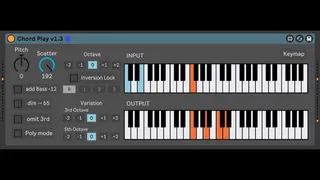
This is a device for playing chords in an easy and intuitive way using only 2 octave or higher MIDI keys.
You can pursue the sound of chords at will, distancing yourself a little from music theory.
The left hand selects the chord and the right hand plays the note.
https://x.com/loop_construct/status/1885744924831953255
You can play various kinds of chords by pressing a major key (C2) or a minor key (C#2) and another key at the same time.
For example: C2+D2=major7 , C#2+D#2=minor7 , D#2+G2=7sus4 , C2+D2+F2=major9th
– C2 to B2 are chord selection keys, which can be changed in the keymap window.
– Three chord of any configuration can be added.
– The inversion key allows temporary inversion.
– Increasing the value of scatter will randomly delay the start of the note.
--Keymap--
C2 = major
C#2 = minor
D2 = add major7
D#2 = add minor7
E2 = add 6
F2 = add 9
F#2 = inversion1
G2 = sus4
G#2 = inversion2
A2 = dim (Switchable to ♭5)
A#2 = inversion3
B2 = aug
---------------------------------------------------
2/1 Update:
– Mono and poly toggle button
2/6 Update:
– Fixed a bug that caused loss of note-off signal when entering notes that were too short.
– Adjustments were made to the Scatter.
– sus4,dim,aug can now play second and third notes without pressing the major key.
– Three chords of any configuration can now be added.
2/8 Update:
– Added 3rd & 5th variation buttons.
– Changed GUI layout.
– Fixed a bug that caused wrong midi signals to be sent when the polymode button was pressed after startup.
Comments (2)
You can play various kinds of chords by pressing a major key (C2) or a minor key (C#2) and another key at the same time.
For example: C2+D2=major7 , C#2+D#2=minor7 , C2+D#2+G2=7sus4