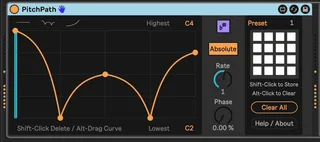
Pitch Path3
You specify the time duration the line represents, as well a...
- Type
- MIDI Effect
- Author
- zsteinkamp
- License
- None
- Live version
- 12.0.5
- Max version
- 8.6.2
- Downloads
- 0
- Updated
- 2025-03-24
Pitch Path3 is a MIDI Effect for Ableton Live by zsteinkamp, distributed as freeware, with no license specified by the author. It targets Live 12.0.5 and Max 8.6.2. First published 2025-03-18, last updated 2025-03-24. 2 user comments below.
New to Max for Live? Read what MIDI Effects do, how device licenses work, how to install a device.
Description
You specify the time duration the line represents, as well as the lowest and highest notes (absolute or relative).
Note that PitchPath only deals in note pitch, and is completely decoupled from the rhythmic element of a musical phrase. This lets you treat pitch and timing independently. For instance, you could have a short looping clip of notes representing the rhythmic element of a melody. PitchPath receives each note, and depending on where it is in its own timing cycle (controlled by the Rate knob) will modify the pitch of the note it received before sending it out. PitchPath can be running at a different cycle length than the clip with notes, so you can get interesting variations or phasing effects between the two.
In Absolute mode, the pitch of those notes is completely disregarded, and the note value from the graph is used instead.
In Relative mode, the graph describes an offset to apply to the incoming note value before outputting it.
In both cases, the note that is output may be optionally aligned to the Global Scale in Live 12.
Consider joining my Patreon for early plugin access, influence on my work, and even 1:1 Max for Live consulting time.
https://www.patreon.com/ZackSteinkamp
Comments (2)