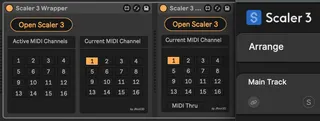
Scaler 3 Wrapper
Wrapper for Scaler 3 - Wrapper Allows route Multi-Out MID...
- Type
- MIDI Effect
- Author
- JRoot3D
- Version
- 1.0.1
- License
- None
- Live version
- 12.1.10
- Max version
- 8.6.5
- Downloads
- 594
- Updated
- 2025-03-28
Scaler 3 Wrapper is a MIDI Effect for Ableton Live by JRoot3D, distributed as freeware, with no license specified by the author. It targets Live 12.1.10 and Max 8.6.5. On maxforlive.com it has 594 downloads. First published 2025-03-27, last updated 2025-03-28. 4 user comments below.
New to Max for Live? Read what MIDI Effects do, how device licenses work, how to install a device.
Description
Wrapper for Scaler 3 - Wrapper
Allows route Multi-Out MIDI Channels in Ableton
Works only in pairs with Scaler 3 Reciever
https://maxforlive.com/library/device/12241/scaler-3-receiver
Scaler 3 Wrapper with Reciever - play only external instruments on all tracks
Scaler 3 iWrapper with Reciever - play Scaler 3 sound on track with Wrapper and external instruments on tracks with Reciever
*KNOWN ISSUES
- Unable to save Scaler 3 state in Live Set
Comments (4)
I love the "Open scaler" button also that can open the same instance of Scaler from any track.
Great Job!!!
Some weird behavior i noticed. Idk if solvable if but would looooove for this kinda device or in future updates.
1. If you have a track armed, when you first open the device it does not let you play midi input until you click something in the UI that triggers midi. Not sure what this is maybe some weird vst midi wake up thing? Notice with most of these vst~ devices that the window that opens takes away lives focus because the vst is hosted in max not through live's plugin host. Might not be something fixable without some crazy Ableton / max integration update.
2. Midi output from triggering chords & such within the UI does not record unless u record from another track. Another weird one. it even shows the midi being output just doesn't record it to arrangement.
3. Duplicating your device does cause odd behavior. Not a crash, but it starts playing the audio like normal as i input midi in Ableton & then stops outputting audio all together. Through out though, it still shows midi is being input in the device. Maybe something odd in regards to the channel filtering?
Thanks for your Job ! Can you (or someone else ;-)) explain exactly how to configure an use this device with Ableton Live ans Scaler ?
Thanks in advance for the reply.