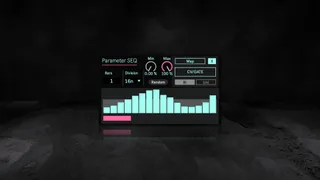
Parameter SEQ
Expressive Parameter Sequencing for Rhythmically Driven Soun...
- Type
- Audio Effect
- Author
- AkihikoMatsumoto
- Version
- 3.0
- License
- Commercial
- Live version
- 12.0.5
- Max version
- 8.6.2
- Downloads
- 0
- Updated
- 2025-04-23
Parameter SEQ is an Audio Effect for Ableton Live by AkihikoMatsumoto, distributed as a commercial (paid) device. It targets Live 12.0.5 and Max 8.6.2. First published 2025-04-21, last updated 2025-04-23.
New to Max for Live? Read what Audio Effects do, what the Commercial license means, how to install a device.
Description
Expressive Parameter Sequencing for Rhythmically Driven Sound Design
Intuitive, Graph-Based Control
https://akihikomatsumoto.sellfy.store/p/ableton-parameter-seq/
Parameter SEQ transforms your workflow with a visually intuitive bar-graph style sequencer. Each step becomes a gesture, drawn directly with your mouse and shaped by your instincts. Designed for fluid interaction, it opens up a tactile way to animate parameters over time.
Syncs with Your Beat, Maps to Anything
Whether you are sculpting bass-heavy grooves, evolving synth textures, or creating spatial dynamics, Parameter SEQ locks perfectly to your BPM. You can assign any MIDI-controllable parameter inside Ableton Live, from synth filters to mixer sends, and bring motion into every corner of your mix.
Classic Techniques in a New Light
Revisit time-tested methods in a fresh and responsive interface. Automate filter sweeps in a techno track, shape decay times in rhythm with your beat, or modulate dry/wet blends with pulsing precision. Parameter SEQ gives familiar techniques a renewed sense of expression.
Modular-Ready with CV and Gate Output
Going beyond the software realm, Parameter SEQ features a CV and Gate output mode that sends control signals as audio. With a compatible interface, you can drive your modular rig directly from Ableton Live. No additional hardware or plugins are required.
For Beatmakers, Sound Designers, and Performers
From home studios to live stages, Parameter SEQ adapts to your creative rhythm. It is not just automation. It is a new instrument for shaping time, movement, and control within your music.
ver.3.0 ... Supports not only standard time signatures like 4/4 and 3/4, but also complex ones such as 10/4 and 7/8.
UI updated. Added min & max. (4/21/2025)
ver.1.1 ... Preset bug fixed, Random button added.
ver.2.0 ... UI updated.
Study Site https://akihikomatsumoto.com/study/
Other Plugins https://akihikomatsumoto.com/download/
Sample Pack https://akihikomatsumoto.bandcamp.com
Ableton Skin https://akihikomatsumoto.sellfy.store/p/ableton-skin-pack/
Spotify https://open.spotify.com/artist/1tZMmxzZbvNu6klyKXa0L1?si=2JZaFeLbREi-UownD8POSg