- Type
- Audio Effect
- Author
- TiagoLeonor
- Version
- 1.3
- License
- None
- Live version
- 11.3.43
- Max version
- 8.5.8
- Downloads
- 688
- Updated
- 2026-03-29
Trance Gate is an Audio Effect for Ableton Live by TiagoLeonor, distributed as freeware, with no license specified by the author. It targets Live 11.3.43 and Max 8.5.8. On maxforlive.com it has 688 downloads. First published 2025-07-15, last updated 2026-03-29. 7 user comments below.
New to Max for Live? Read what Audio Effects do, how device licenses work, how to install a device.
Description
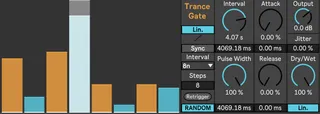
This Device is a simplified trance gate that can work between 2 steps and 64 steps. It can be fixed to the grid or run freely. Have fun with it and leave some feedback for future improvements
1.1 update:
Added individual attack and release controls, replacing the smooth control
Added displays for the pulse width, attack and release times
Added an output dial for level adjustment
The sliders stay as saved after the project is closed and opened again
Ui improvements
1.2 update:
Fully synched with Ableton when in sync mode. It's also aware of which step should be synched to, so results are consistant even working with the arrangement view in this mode
Retrigger possible when in free mode (non synched). Retriggering resets the sequence to the first step
Ui improvements, such as highlighting which step of the sequence is being triggered
1.2.1 update:
Bug fixes: Unable to undo fixed
UI changes
1.3 update:
Bug fixes: Sliders would be set randomly everytime the device was loaded, recalled and copied. Now it is reliable for creating presets, live sets and overall use.
Calibrated the attack and release times for a more reliable use.
Added a jitter control to be able to add unpredictable behavihour to the trance gate.
Added a toggle to switch between linear and exponential scales for the slider values.
Added a toggle to switch between linear and exponential scales for the Dry/Wet controll.
Ui changes
Comments (7)
Thanks
Awesome work, reminds me of Killoherts Trance Gate.
It would be great to borrow a couple of their features
1. Step Animation
2. Resync the device on downbeat when turned off and back on.
Thank you for all you do!
Thank you for your feedback and praises.
I took your feedback into consideration managed to implemented your suggestions
Have fun!
While exploring ways to create a few pre-programmed pattern variations and switch between them, I noticed a strange behavior. When using two or more chains of the device (for pattern variations), if you change the number of steps on one chain and then switch to another, the animation and the pattern seem to drift off the grid. I’m not very familiar with the Max environment, so I’m not sure how complex this would be to address. That said, if preset saving is possible, this issue might not even need fixing. Having recallable pattern variations would be amazing in a live performance scenario.
Love your work.
Wish you all the best!
Thank you for all your feedback. Have been really busy, and managed to implement the fixes for the problems you mentioned.
Hope you enjoy the new version of the device!
Thank you once again for the kind words.
Wish you all the best as well!