EASY TRACK SCANNER - Free006
To continue our goal of improving usability in Ableton Live ...
- Type
- Audio Effect
- Author
- davidbirdwell42
- License
- None
- Live version
- 12.0.5
- Max version
- 8.6.2
- Downloads
- 0
- Updated
- 2025-07-26
EASY TRACK SCANNER - Free006 is an Audio Effect for Ableton Live by davidbirdwell42, distributed as freeware, with no license specified by the author. It targets Live 12.0.5 and Max 8.6.2. First published 2025-07-20, last updated 2025-07-26.
New to Max for Live? Read what Audio Effects do, how device licenses work, how to install a device.
Description
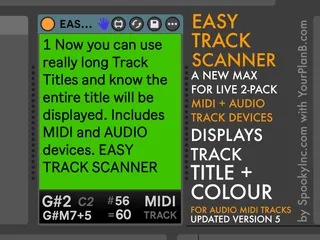
To continue our goal of improving usability in Ableton Live with our EASY TO READ M4L Series, our newest device displays the Track title in an large, easy to read font AND adds a large colour block background so you always know what track you’re working on at a glance!
Just change your track title or background colour, and EASY TRACK SCANNER will instantly update! And because some Track labels can be darker or lighter, you can just click the face of the device to toggle the Track Title text between Black and White for better usability.
Included are two versions included in this release…
- AUDIO version works on Audio Tracks or in the Audio Effects area of a Midi Track
- MIDI version (for Midi Tracks only)
----------------------------------------------------------------------
VERSIONS
Version 004 has been updated to display the type of Track, as well as the Title and track Colour. All to help streamline your workflow.
Version 005 is a major upgrade to both the Audio and Midi versions with added live feedback...
MIDI = Now displays Note, Root note, Chord, CC#, Value of CC, + Track type
AUDIO = Now displays Left + Stereo Right loudness (dB), Stereo level visualized, + Track type
Version 006 has some minor cosmetic changes
----------------------------------------------------------------------
BUY ME A COFFEE
While we try to make many of our devices free, we really appreciate the extra payment if you can. Try them out first, and if one works it’s way into your Live Template, we’d appreciate a little donation. Thanks for all the support!
https://buymeacoffee.com/davidb