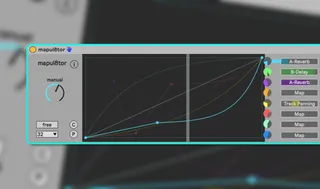
Mapul8tor
maps one control to up to eight parameters in Ableton Live. ...
- Type
- Audio Effect
- Author
- soundmanufacture
- Version
- 2.0
- License
- None
- Live version
- 12.0.5
- Max version
- 8.6.2
- Downloads
- 0
- Updated
- 2025-08-23
Mapul8tor is an Audio Effect for Ableton Live by soundmanufacture, distributed as freeware, with no license specified by the author. It targets Live 12.0.5 and Max 8.6.2. First published 2025-08-18, last updated 2025-08-23. 3 user comments below.
New to Max for Live? Read what Audio Effects do, how device licenses work, how to install a device.
Description
maps one control to up to eight parameters in Ableton Live. Each target has its own editable curve, so a single knob (or automation lane) can drive different parameters in different ways. It’s a continuation of the original Mapulator concept by Jonathan Kops (BentoSan).
Handy for macro morphs, coordinated multi-parameter moves, and custom crossfades (including multiple A/B fades) from a single control.
• Single main knob can drive eight independent mappings.
• Each mapping has its own curve you can draw with breakpoints (click/add, shift-click/delete, drag/move, alt-drag to bend).
• Grid snap and copy/paste for curves.
• Per-mapping output scaling, lock/unlock behavior, and optional real-time modulation.
Comments (3)