Parameter Morpher
The first utility device for Ableton Live that lets you morp...
- Type
- Audio Effect
- Author
- midrun
- Version
- 1.0.1
- License
- Commercial
- Live version
- 12.0.5
- Max version
- 8.6.2
- Downloads
- 0
- Updated
- 2025-08-28
Parameter Morpher is an Audio Effect for Ableton Live by midrun, distributed as a commercial (paid) device. It targets Live 12.0.5 and Max 8.6.2. First published 2025-08-22, last updated 2025-08-28.
New to Max for Live? Read what Audio Effects do, what the Commercial license means, how to install a device.
Description
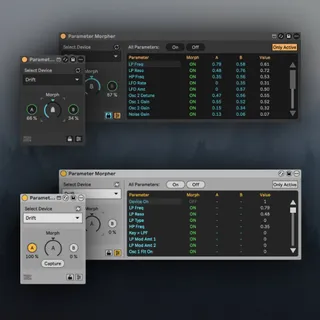
The first utility device for Ableton Live that lets you morph between two presets with one single knob. Designed for both quick experimentation and precise control, with per-parameter scope, fast UI, and safety feedback built in.
Features
---------
Morphing with scope:
Turn Morph on or off per parameter, so only the parameters you choose will respond to the morph dial (0–100%).
Multi-device support:
Works with instruments, audio effects, midi effects and third party plugins. Morph between presets without losing A/B snapshots or per-parameter on/off within the session.
Snapshot capture & edit:
Capture two snapshots (A and B) from the current device. Edit A/B directly in the table (enter numbers, “-” to clear). The device auto-sets Morph OFF if A and B are equal, and turns it ON again if you later capture/edit them to differ.
Only-Active view:
Toggle Only Active to show just the parameters with Morph = ON for a clean, performance-ready view.
Safe refresh (no data loss):
Refresh the track to pick up newly added devices or new parameters. Existing A/B values and on/off states are preserved.
Live feedback outputs:
The green rings around A and B report whether any snapshots exist for the selected device.
Table UI designed for speed:
Compact, inline editing. Parameter names left-aligned; A, B, and Value centered. “-” shown when A/B are empty.
Color coding: Morph ON = green, OFF = gray, A/B present = teal, Values = gray.
Bulk actions:
All On / All Off quickly toggles Morph scope across every parameter of the selected device.
How it works
-------------
1. Drop the device on a track.
2. Choose a target device from the dropdown.
3. Enable Morph ON for the parameters you want to move.
4. Capture A and B (or type values directly).
5. Turn the Morph dial (0–100%) to move between A and B.
6. Use Only Active for a focused performance view
Requirements
--------------
- Ableton Live Suite with Max for Live (Live 12 recommended).
- Works on macOS (Windows not yet tested).
This tool is built for producers and performers who want:
- smooth A/B morphing across many parameters
- precise control over what responds (per-parameter scope + filter view)
- live-safe behavior with clear visual and boolean feedback
- a fast, compact interface that suits both quick play and detailed tweaking