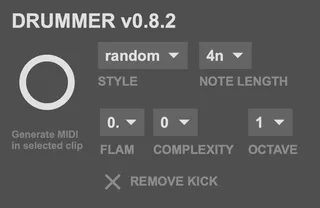
- Type
- MIDI Generator
- Author
- scribbletune
- Version
- 0.9
- License
- None
- Live version
- 11
- Max version
- 8.6.2
- Downloads
- 1,333
- Updated
- 2026-08-02
Drummer is a MIDI Generator for Ableton Live by scribbletune, distributed as freeware, with no license specified by the author. It targets Live 11 and Max 8.6.2. On maxforlive.com it has 1,333 downloads. First published 2025-08-29, last updated 2026-08-02. 5 user comments below.
New to Max for Live? Read what MIDI Generators do, how device licenses work, how to install a device.
Description
Transform your Ableton Live workflow with Drummer, a sophisticated Max for Live device for Ableton Live 11 and 12 that puts the entire history of drum machine patterns at your fingertips. Based on René-Pierre Bardet's legendary "260 Drum Machine Patterns" book, this isn't just another drum sequencer - it's your gateway to decades of professionally crafted grooves.
Demo: https://www.youtube.com/watch?v=H76q-O8APdI
🎵 MASSIVE PATTERN LIBRARY
• 260+ authentic drum patterns spanning 18+ genres
• Rock, Funk, Disco, Reggae, Jazz, R&B, Hip-Hop, Blues, Afro-Cuban, Bossa
Nova & more
• Hundreds of fills and breaks for dynamic arrangements
• Every pattern professionally crafted and time-tested
🎛️ INTELLIGENT GENERATION
• Smart genre selection or full random mode
• Pattern complexity control (minimal to complex fills)
• Advanced variation engine with humanization
• Flam support, accent placement, and velocity layering
🎯 PERFECT INTEGRATION
• Works seamlessly with stock drum devices and Native Instruments Battery
• General MIDI compatibility with adjustable octave range
• Real-time MIDI generation for maximum flexibility
Comments (5)
Thanks for the work!
I'm happy to send on session info or anything else that could be of help for troubleshooting. Just let me know what I can do to help.
Thanks again for getting back to me.
https://youtu.be/QUFcEoIe6fI