- Type
- MIDI Effect
- Author
- scribbletune
- Version
- 1.4
- License
- None
- Live version
- 10.0.1
- Max version
- 11
- Downloads
- 1,150
- Updated
- 2026-08-02
Riff is a MIDI Effect for Ableton Live by scribbletune, distributed as freeware, with no license specified by the author. It targets Live 10.0.1 and Max 11. On maxforlive.com it has 1,150 downloads. First published 2020-04-11, last updated 2026-08-02. 3 user comments below.
New to Max for Live? Read what MIDI Effects do, how device licenses work, how to install a device.
Description
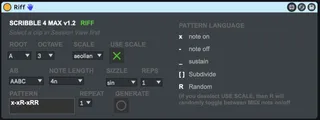
Made with Scribbletune (the free and open source JS lib for creating musical patterns with JavaScript)
This device is created to use the simple pattern language of Scribbletune to generate quick Riffs. You can choose a scale or mode (over 100) to make the riff melodic. It also has AB parts (and ABC parts) to create interesting riffs and can even be used to create individual drum parts!
Demo: https://youtu.be/Gro6LJBJZro
Comments (3)
i made a update of your patch
https://maxforlive.com/library/device/7854/riff-4
it can Open along side live
Work great on live 11 on mac and PC (( MPE )) no compatible
no time to update MPE
see here
https://cycling74.com/articles/what's-new-in-live-11-part-2
for update MPE LIVE
and repair bug
MAX console error on load
js: C 3 lydian,xRRRxxRR,AABC,4n,none,1,1,1 Aiicaramab
js: riff02.js: Javascript Error: c 3 lydian does not exist!, line 1
js: error calling function riff [riff02.js]
can news help understand JScript from MAX
exp:
how to replace "R" with octave tonic or a with one or more spécific note at the place of all scale note with your patch
like this tuto
https://scribbletune.com/examples/riff
const clip = scribble.clip({
notes: 'D2',
randomNotes: 'D3',
pattern: getRandomPattern(),
subdiv: '16n',
});
-----------------
and how generate riff along Chord progression
like this
scribble.getChordsByProgression(root + ' ' + scale, 'ii iii')
https://scribbletune.com/examples/riff
many Thanks
Random notes
Next, we’ll create a clip and set the notes to be used. We’ll also provide a set of notes for Scribbletune to choose from, for the R character. We can simply use the higher octave of our root note. So something like,
const clip = scribble.clip({
notes: 'D2',
randomNotes: 'D3',
pattern: getRandomPattern(),
subdiv: '16n',
});