MIDI Note Range to CC
This MaxForLive devices converts incoming MIDI notes into MI...
- Type
- MIDI Transformation
- Author
- ecgwdgs
- Version
- 1.0
- License
- None
- Live version
- 12.0.5
- Max version
- 8.6.2
- Downloads
- 0
- Updated
- 2025-10-07
MIDI Note Range to CC is a MIDI Transformation for Ableton Live by ecgwdgs, distributed as freeware, with no license specified by the author. It targets Live 12.0.5 and Max 8.6.2. First published 2025-10-06, last updated 2025-10-07.
New to Max for Live? Read what MIDI Transformations do, how device licenses work, how to install a device.
Description
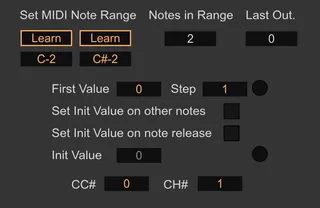
This MaxForLive devices converts incoming MIDI notes into MIDI CC values on a chosen CC number and channel.
It basically lets you send CC messages with your MIDI controllers or MIDI clips.
The device lets you set a note range, the first note send the first value and each semitone adds a step to the value. The step can be negative, but the output is clipped in 0-127.
It sends your values on the selected CC number.
You can send a second value when you play other notes and/or when you release your target notes.
How to use:
Put the device on a MIDI track.
Choose the CC No. and MIDI Channel.
Select your note range (notes min and max included).
Set Start Value and Step value.
Enable Init on other notes / Init on release, and set the Init Value if needed.