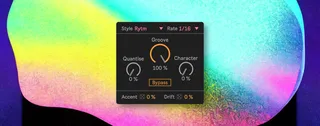
Groovebox
Inject intelligent drum machine swing straight into your pat...
- Type
- MIDI Transformation
- Author
- wavefolded
- Version
- 1.0
- License
- None
- Live version
- 12.2.5
- Max version
- 9.0.7
- Downloads
- 0
- Updated
- 2025-10-20
Groovebox is a MIDI Transformation for Ableton Live by wavefolded, distributed as freeware, with no license specified by the author. It targets Live 12.2.5 and Max 9.0.7. First published 2025-10-19, last updated 2025-10-20.
New to Max for Live? Read what MIDI Transformations do, how device licenses work, how to install a device.
Description
Inject intelligent drum machine swing straight into your patterns.
Overview
Groovebox is a Transformer-type MIDI Tool for Ableton Live 12 that reshapes existing clips with the timing, feel and quirks of legendary drum machines with a twist. It’s not just a swing slider, it expands on the classic drum machine grooves and uses proportionate push-pull timing as well as velocity accents and subtle randomness for grooves that feel alive. Groovebox applies gravity-like weighted offsets from classic drum machines and synthesisers like the Octatrack, TR-909, SP-1200 and more, giving your drum patterns a unique character.
Key Features
• Machine Emulation: Choose from a number of iconic drum machines
• Proportionate Scaling: Doesn't just shift single notes but pushes and pulls surrounding notes
• Groove Control: Dial subtle feel or extreme swing amount
• Rate Options: Add groove at 1/4 to 1/32 divisions
• Velocity Shaping: Add dynamic accents tied to the groove
• Character Dial: Amplify the unique characteristics of each machine
• Quantise Blend: Tighten the original pattern before applying groove
• Drift: Inject micro-variations for humanisation
Mini-FAQ
Q: Does it only work on drums?
A: While inspired by drum machine swing, Groovebox works on any MIDI clip.
Q: Do I need to know the original machines?
A: Not at all. The machine list is there for flavour but you can just pick the groove that feels best.
Q: Can I edit the notes afterwards?
A: Absolutely. All changes are printed to the clip so you can tweak, rearrange or fine-tune like any standard MIDI clip.
Q: Isn’t this just cheating and taking away from creativity?
A: Groovebox doesn’t replace creativity, it enhances it. It’s your musical taste that decides which grooves work and how far you should push them. It’s a tool for creative feel, not a shortcut to ideas.
Please Note
All processing is on-device. Pressing the Transform button in Ableton's GUI will create unintended changes to your MIDI clip.
Preview
https://www.youtube.com/watch?v=iKIKZNNIfu8