- Type
- Audio Effect
- Author
- 10Guitars
- Version
- 1.0
- License
- None
- Live version
- 8.3
- Max version
- 5.1.9
- Downloads
- 499
- Updated
- No Updates
XG Launcher is an Audio Effect for Ableton Live by 10Guitars, distributed as freeware, with no license specified by the author. It targets Live 8.3 and Max 5.1.9. On maxforlive.com it has 499 downloads. Published 2012-12-05.
New to Max for Live? Read what Audio Effects do, how device licenses work, how to install a device.
Description
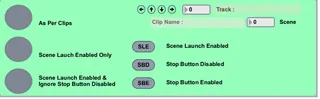
Selective Clip Launching. This device allows you to specify which clips within a scene will be launched and which will stop other clips in the same tracks.
When you have decided the behavior of your clips you can navigate through them using the arrow interface and apply a "tag" which is added onto the end of the clips name. (those with out a name will just have the tag applied)
Highlight the scene you want to work with then you then have three launch types;
1: Launch all clips as per tags
2: Launch only clips tagged with SLE (Scene launch enabled)
2: Launch clips with SLE but ignore SBE (Stop Button Enabled) tags
Obviously if you want to launch all clips in a scene you use Live's native scene launch button
Handy if you don't have a midi controller with multiple buttons you can assign to multiple clips
Feel free to comment or report bugs :-)
10 Guitars - Birmingham, England