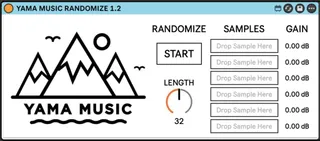
Yama Music Randomize
The premise of the YAMA Music Randomize is simple. Load up t...
- Type
- Audio Effect
- Author
- yamamusic
- Version
- 1.2
- License
- AttributionNonCommercialShareAlike
- Live version
- 11.0
- Max version
- 8.6.2
- Downloads
- 0
- Updated
- 2025-11-13
Yama Music Randomize is an Audio Effect for Ableton Live by yamamusic, distributed as Creative Commons Attribution-NonCommercial-ShareAlike. It targets Live 11.0 and Max 8.6.2. First published 2025-11-12, last updated 2025-11-13. 8 user comments below.
New to Max for Live? Read what Audio Effects do, what the AttributionNonCommercialShareAlike license means, how to install a device.
Description
The premise of the YAMA Music Randomize is simple. Load up to 6 of your favourite samples or one shots, set the length of bars you would like it to trigger and hit play! The Randomize will then play those samples at complete random and even as a producer, when sat at your computer, you’ll be delighted with the random sound that hits you.
Once your samples are loaded and the length of time is set to trigger the samples, you can add a Midi note on middle C, which is C3 on the Ableton Piano Roll.
Stretch the note to the length you selected on the device (16, 32 or 64) and the device will trigger as soon as you hit PLAY.
The device will continue to trigger samples whilst Ableton is playing.
Comments (8)
https://www.yamamusic.co.uk/blog/introducing-the-yama-music-randomizer/