TrackVolumeKeyshort
#demo# https://youtu.be/bJtT9ph8YeY?si=4S6MPjZrcaazYL1u...
- Type
- Audio Effect
- Author
- Arplugz
- Version
- 1.0
- License
- Commercial
- Live version
- 12.0.5
- Max version
- 9.0.8
- Downloads
- 0
- Updated
- 2025-11-25
TrackVolumeKeyshort is an Audio Effect for Ableton Live by Arplugz, distributed as a commercial (paid) device. It targets Live 12.0.5 and Max 9.0.8. First published 2025-11-24, last updated 2025-11-25.
New to Max for Live? Read what Audio Effects do, what the Commercial license means, how to install a device.
Description
#demo#
https://youtu.be/bJtT9ph8YeY?si=4S6MPjZrcaazYL1u
TrackVolumeKeyshort is a Max for Live device designed to streamline your music production workflow in Ableton Live.
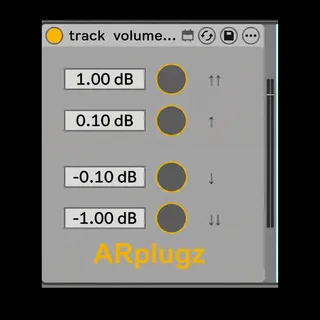
The interface features four adjustable text boxes paired with four corresponding buttons. Pressing a button raises or lowers the volume of the currently selected track by the specified amount.
By assigning keyboard shortcuts to these buttons using Ableton Live’s Key Mapping feature, you can control track volume without relying on your mouse or manually entering values—significantly speeding up the production process.
[Features]
・Four text boxes for configuring the amount of dB change applied when pressing each button
・Supports precise decimal values
・Four buttons for increasing or decreasing the volume of the selected track
・Supports key mapping
[System requirements]
Max 9.
Ableton Live 12 suite