- Type
- MIDI Effect
- Author
- soundflower
- Version
- 9.6.5
- License
- AttributionShareAlike
- Live version
- 8.1
- Downloads
- 17,217
- Updated
- 2010-02-17
monomeemu0. is a MIDI Effect for Ableton Live by soundflower, distributed as Creative Commons Attribution-ShareAlike. It targets Live 8.1. On maxforlive.com it has 17,217 downloads. First published 2009-12-21, last updated 2010-02-17. 82 user comments below.
New to Max for Live? Read what MIDI Effects do, what the AttributionShareAlike license means, how to install a device.
Description
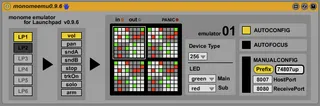
monome emulator for Novation Launchpad.
Release(Alpha)
v0.9.6a5
------------------------------------------------
Bugfix:
While using other mode(sessin, user1 or mixer), button trigger is sent to the host app.
v0.9.6a4
------------------------------------------------
Improvements:
Speed up the return from other modes to user2 during the performance.
v0.9.6a3
------------------------------------------------
Bugfix:
When using a other mode(session, user1 mixer), LED states are mixed.
when receive port is changed, port number of bonjour is not reset.
v0.9.6a2
------------------------------------------------
Bugfix:
If you use autoconfig, often Ableton crashes.
v0.9.6a1
------------------------------------------------
Features:
* 8 Emulator Devices(monome64 ,128 or 256)
* 6 Launchpads
* Multi Color Device
* autoConfigration
* autoFocus
Operating Instructions:
http://code.google.com/p/monomeemu/wiki/OperatingInstructions
Old and stable versions(v0.9.3)
------------------------------------------------
http://code.google.com/p/monomeemu/downloads/list
Discussion
------------------------------------------------
monomeemu discussion at monome official website:
http://post.monome.org/comments.php?DiscussionID=6759
(Thanks le k!)
Comments (82)
working with stretta monome suite patches (autofocus track too).
bug: lights bugs while you switch from user 2 to user 1 or session or mixer, the lights are freezed to preview state from user 2.
Not working correctly with 7up. The seven core givez the big 7 when starting, lights from looper (1) seems to work, but you can't change from bank 1 (looper) to the others 7 banks.
I'm sure you can fix all of that in the next versions :)
thank your bug reports.
I will work to fix bugs.
@animatek
sorry...
i don't have apc40.
support only for launchpad.
1. load monomeEmu device, and you select launchpad and user2 mode.
2. set Prefix'7up' on monomeEmu.
3. load sevenUpCore device, and you click 'start/stop connections' button only once.
7up will working with monomeEmu correctly.
when you can not change nav menu, please check max window on M4L.
if java exceptions or Errors string is occured, please reboot your live.
udp(osc) server initializing process on 7up is slow.
when you click 'start/stop connections' button repeatedly, Java Exception will throw.
old osc process would continue to send packet.
thx for the details,
I'm gonna check it again.
Am I the only one?
Thank you for you help :)
Sorry.
I released fixed version.
Please try latest Patch(0.9.1).
@bigice
Prefix is unique key for that Launchpad communicate to host application.
You must specify 'same Prefix' for each other to communicate.
Please read monome documents.
http://docs.monome.org/doku.php?id=app:monomeserial
In this document, monomeserial is monomeEmu for launchpad.
monome application list is here.
http://docs.monome.org/doku.php?id=app
My English is so poor, I can not describe in detail.
Please enjoy.
Just tested 0.9.1 with 7 up it works like a charm!!
No more display leds bugs!
Fantastic :)
Congratulation, wonderful job!
No need a third party application to run my launchpad as monome emulation, thx santa claus :)
I tested also 7 up + stretta monome suite into the same set with your patch still can't have both of them controlable, stretta takes the advantage, but that is normal, see there:
http://post.monome.org/comments.php?DiscussionID=6538&page=2#Comment_76829
So next, this what i would like to be able to do:
-using user1 as a second independant (different prefix and adress) monome emulation. God, hope someone will work on that!
Please let me know if you can, I will be grateful.
Thank you in advance.
>>"using user1 as a second independant monome emulation."
OK.
it's great idea!!
I'm working for the next version.
but I'm not too much time:(
@abletenor, djflash, lek
Fundamentally, Launchpad and M4L have hi-latency more than monome...
If Launchpad handle large volumes of osc messages at once, LED updates might be delayed.
Also, for the same reason, responses of button pads might be delayed.
Live API process on M4L is much slower than monome osc/serail communication speed.
Launchpad uses low-speed USB(it take 200 milliseconds to update all LED on Launchpad).
monome OSC Message style is inefficient(for example、 1 OSC message"/led_row" is convert to 8 messages that Launchoad can understand).
Without M4L, nonome approach(communication with midi) may be best way、if you focus on speed.
Hi, I didn't get any latency with the first realese of your patch, it worked fine for me with all the patches (7 up, monome suite etc etc)
Since last realese of your patch was causing latency I went back to the nonome launchpad edition with max msp runtime.
Is there any chance to have your first patch back?
If you can email to me that will be very nice from you.
This is my email " [email protected]"
By the way merry christmas, and thanks.
Sorry to bother you.
OK.
I sent email.
and
HAPPY CHRISTMAS To ALL
Glad you like my "user1" idea :)
I would love to play with stretta and 7up in the same set, damn!
About latency, thx for the technical details (which let me think more and more i want a monome....), but as i said i haven't noticed latency with your last patch.....gonna test again and again if i find out something.
again about multi patch with monome, check teaser of upcoming release of monoroute, it might give you maybe some ideas about m4l integration:
http://vimeo.com/8151409
I'm up to test all kind of patches if you need it, ask for my email if you want.
best
The only problem I'm having with 7up is no blinking light for the sub-navigation buttons. Hard to move around between the different compononents. Anyone else having this problem??
Thx,
Dave
thank you:)
I'm testing monoroute with my monome.
@ disco3000
Please press the solid light button(showing current mode) once, and press a different mode button.
but if you change mode....
Please check Max window, right click on M4L device.
if java exceptions or Errors is occured, please reboot your ableton live.
i also wanted to add a +1 to lek's 'user 1' suggestion. i'm currently using the 'session' and 'mixer' mode on the launchpad as a standard clip controller. 'user 2' mode controls 7up - mainly the looper function.
it would be cool to setup 'user 1' to control another M4L app such as stretta's suite or another killer patch that has yet to be developed ;-) so many possibilities this will bring.
anyway, just wanted to show some appreciation and offer more encouragement - i think many users will be using this patch on a daily basis!
Thanks again Soundflower--this is a great patch and I'm looking forward to seeing how it develops...
I found out why the latency occurs, not only with your patch but also with many M4L patches and I also realized that most of M4L preset are broken and Live is not working proprerly as usual.
The problem is the new update of MAX to 5.1.1 that doesn't work properly with the latest version of LIVE 8.1.
The solution is to go back to the oldest version of MAX 5, or download the new beta version of LIVE.
You can find details and download version of MAX and LIVE here:
http://forum.ableton.com/viewtopic.php?f=2&t=132455
Thank you soundflower for the effort of the new update patch.
All the best.
Thanks for reporting.
I didn't know MultiColorDevice option.
I'll see the details of MultiColorDevice option.
And if possible, I would like to support.
@ abletenor
Thank you for useful information.
I'm still using the old version.
http://code.google.com/p/monomeemu/
Please try.
http://code.google.com/p/monomeemu/downloads/list
0.9.2alpha --support multi-device emulation
To switch virtual two devices, use the buttons "vol" and "pan" on left side navi.
On user1 mode, M4L can't get the button matrix input...
I'm wondering:(
I'm working on "MultiColorDevice option".
great, i'm gonna test 0.9.2 multi device emulation right now and give you a report.
About user1 mode, I'm pretty sure we have to change launchpad python code to get it working...
if save the session the prefix is set back to default, same happens for presets - if i change the Maxpatch to the default prefix 7up the whole thing doesn't work any more (doesn't send anything to the Launchpad anymore)
Any advices?
http://code.google.com/p/monomeemu/downloads/list
Add:
Quad devices emulation patch.
Improvements:
Support multi-device emulation
Support autofocus of stretta monome suite.
LED color is editable.
Add quad devices emulation.
Support mutliColorDevice option of 7up.
In 7up, monome64 and multiColorDevice can be used either.
To switch virtual quad devices, use the buttons "vol", "pan", "sendA" and "sendB" on left side navi.
@ verstaerker
Sorry.
monomeemu is not yet implemented a way to save the preset.
When I've finished implementation of features, I will work.
dude, you re a champion!
0,9,2 works like a charm, I tested it with 7up + several monome suite patches (few obo, 1 or 2 polygome...), and it works!!!
oh my god, this is absolutely brilliant, i was expecting something like that since 1 month :)
and the color choice between the both emulation is just awesome!
best way to get it working:
change adress on sevenup core to 8001 / 8081 , put 7up for prefix and use monome02 .
Don't change anything on monome01, you ll use it with monome stretta suite, easier with autfocus/track and the original adress (8000/8080).
Put autofocus on monomeemu for the both.
- I ve got some little glitch or slow sometimes when i change from 1 stretta patch to an other one,...it's maybe about my plugin buffer, I must check it.
- I have had 7up freezed once.
I'm going to test it again and again and report all kind of bugs.
Maybe in a future version will have a chance to get a 8 monome selector emulation...? Or maybe we can't cause launchpad port is too slow compare to a true monome.
Whatever, I think this patch would be also really interesting for thoses who want to develop a multi monome application in live like monoswith or monoroute but integrated in m4l
Soundflower,
congratulation!
http://post.monome.org/comments.php?DiscussionID=6759
Thanks for new discussion thread and alpha testing!!
Best
You did such a good work with monomeEmu, really incredible.
I'm still up for testing all kind of features or new patches, just ring the bell :)
I also have a bunch of ideas for new patches, but not able to program in code, maybe in the future....
Also, it appears that sometimes it turns the track autofocus off. Going to look into this and see if I can fix it.
Amazing work!
Thanks for your reporting.
I've uploaded v0.9.2a3
when you turn on/off autofocus or multicolor, LED will be initialized(light off).
http://code.google.com/p/monomeemu/downloads/list
I can implement thad LED will be initialized when autofocus message("/sys/prefix hoge") received from monome patch.
But that may be unexpected behavior.
hmm...
"
you're right, same for me, still.
v0.9.2 and v0.9.2a3 diff:
Add annotations of info view in Live.
7up has the latency problem with MAX 5.1.1.
Please check this thread.
http://post.monome.org/comments.php?DiscussionID=6828
keep up the good work.
really appreciate it
thank you very much indeed.
you're great!!!
Please check this video:)
http://www.youtube.com/watch?v=xqQDeBv0VAg
nice 1 bruv, will try it tonight ;)
cheers,
g.
On user1 mode, button input is automatically mapped to MIDI.
M4L can't get button input.
I hope to be available user1 mode...
sorry mate - at 0.07 on your video when autoconfig is pressed on 7up - mine doesnt change osc prefix/osc host - any idea why pls?
Please use v2.0.4 or later of 7up.
and if you use windows, you need to install Bojour service package.
Please check here.
http://code.google.com/p/monomeemu/wiki/OperatingInstructions
I have two computer in the studio and a laptop on the road the same versions, etc., only windows on it is different, studio w7, laptop xp. So everything istalliert on both computer and copied all the same. 7up2.0.4 and monomeemu 096a5 my studio computer with w7 works perfect with monomeemu, 7up stepper goes looper all
my laptop XP>> start 7 up and monomeemu click on monomeemu to LP1, the light runs once around the outside autoconect also runs all right. I can not choose the multicolor device, I click on start connection and I'm still waiting for the 7
w7 on my pc, I can choose multicolor, and also see the 7 on my launchpad
HEEEEEEEEEEEEEEEEEEEEEEEEELLLP
use a translator I hope you understand that
Please right click mouse on monomeemu and choose open MAX window.
Now try to start monomeemu and 7up and see if any errors are written to the window.
In the Max window
first
Under Message: Unable to create JVM
secondly
Under Object: live object,
under Message: call set_mode 2: no vaild object set
the red-backed now I just texted
Have informed me what JVM is. Did the JVM on the Java page tested. Java page says everything ok.
java page say everything is OK but in Max Window still Unable to Create JVM
first of all Id like to say thank you for the emu again! Its cool to use it together with 7up. But in case of the m4l stretta suite I got some problems.. sorry for bothering with this..I read the thread soundflower pointed to "http://docs.monome.org/doku.php?id=app:monomeserial
In this document, monomeserial is monomeEmu for launchpad." but somehow couldn't find out how to adress the diffrent midiInstruments from stretta. As far as I understood it should all happen automatically. I m running the current Emu of Soundflower and the current stretta release, nothing else in my project. I use 1 of 2 LP as 64 device. Im a beginner with this so my silly question is, do I have to set the prefix and match the host/listener? Im confused cause I don't find any autoconfig buttons an the stretta mididevices. Could somebody point me to a thread or has some experiences?
thx
URL:
http://www.youtube.com/watch?v=tgOiTFYZZWE&feature=player_embedded&eurl=http%3A%2F%2Fvnseopro.com%2Fwatch-tgOiTFYZZWE%2Foperating-instructions-monomeemu-and-stretta-patchesno-sound.aspx#
I was busy at work.
@Alien
please install Java Runtime Environment 1.5 or later.
reinstall Max 5.1.3.
copy jars from 7up folder.
http://post.monome.org/comments.php?DiscussionID=7251
7up discussion is here.
you will find out details.
http://post.monome.org/comments.php?DiscussionID=6497
@turrican
more details:
http://code.google.com/p/monomeemu/wiki/OperatingInstructions
please check!!
This is a really wonderful device you've put together, props to you for the work.
I'm experiencing the latency issue with 7up, using max 5.1.3 and ableton 8.1.1. About 500 ms to start with and then getting worse as time goes on.
I've noticed that the threads above seem to indicate the problem was fixed in 5.1.2, but for me this seems not to be the case.
I wonder what it could be?
Sorry, I still use Max5.1.2(and ableton8.1.1).
Max 5.1.2 is stable and no problem.
Please use "Multi Color Device" mode on 7up.
Is there a way to do this inside of Live/M4L? It would mean translating the output from the MonomeEmu into midi, and routing it back into Live... Please tell me this can be done!
sorry.
this patch is optimized for monome OSC message format.
so, can not use MIDI or your custom OSC message.
but you can customize this patch...
if you use MIDI, i think that simple to use user1 mode.
second, a question: I've installed monoemu, bonjour, 7up... and everything seems to be ok. But when I try the last step in your video, activating 7up, nothing happens in monoemu nor my launchpad :-( Any idea?
The monomeemu works just like on the instruction video - well, almost...
...The top four directional buttons work just fine, as do all of the 8 side buttons but NONE of the pads seem to work when pressed! The pads all light up although there seems to be some delay that is introduced into the display of the LED's every 4 to 5 bars.
I have seen videos on YouTube showing the Launchpad working very well in a similar configuration as mine so chances are that I am NOT doing something right. Imagine that! I will appreciate any help anyone can provide in getting this to work properly. Thank you in advance for this magnificent piece of software and many thanks to anyone who may be able to provide any guidance to help me fix this problem.
BTW: I am running all of this in a Dell Studio XPS 1645 with an i7 processor and 8GB RAM.
Each row is a note...each column is a step. Some ability to scroll up the key notes or down as needed and possibly to expand past 8 steps would be ideal. Is this within the ability of this programs setup or should I keep an eye out for more of a script setup? Just thought I'd ask here.
i used the monome emulator many times but suddenly it stopped working.
When i connect (LP1), the lights on the launchpad light up as normal. But i can't get no input in usermode 2. At least no pad input. I can change the emulator and all (vol pan snd ...). When i press a pad, i only see "out" flickering orange. But no "in". I checked the midisetting, reinstalled usb driver, redownloaded monomeemu.
The launchpad works fine itself. User mode 1 works as usual for example.
I didn't change any system or midi setting.
edit: i tried to use it with an older live version and it works well there. i compared the setting but couln'd find a difference. It worked in the newer version of live before... I was with a friend some days ago and i wanted to use my launchpad with the monomeemu on his computer. Same issue, no in LED in monomeemu is flickering and it worked on his setup before. All he changed was, that he installed an APC20. We disconnected all hardware but nothing changed.
I know, this isn't the place to ask questions about the monomeemu, but i thought, that it maybe has something to do with the launchpad drivers or that someone here had the same issue
thx for the help
Thanx
JR
I'm having some big trouble with this.
My Launchpad doesn't show on the list on the left, " LP1 " doesn't light up.
I'm on Osx 10.7.3, Live 8.2.6 and Max 6.
Im the Max Windows appears this message:
"js: getLaunchpad.js: Javascript TypeError: "control_surfaces" is not a function, line 12
js: error calling function init"
thanks again!
Probably we should go back to MAx5 RT?
thanks
I can confirm it does not work with Max 6 as M4L editor in Live.
Now that we have Live 9 and we can upgrade to the standard version keeping M4L and receiving the new devices, it would be great to have a version of monomeemu that works with max6.
Anyone would like to take on the challenge?
Cheers
I have a Launchpad Mini and it's not working.
First there is the js object at the beginning who filter the devices, and who are looking only for launchpad. But maybe after in the patch there is other part who need to be change to be compatible with a Launchpad Mini.
If someone can help me with that I will be glad to use this patch with a LP Mini :D
Cheers !
Plz help !!