- Type
- MIDI Effect
- Author
- upsidedownhead
- Version
- 1.0
- License
- Commercial
- Live version
- 12.0.5
- Max version
- 8.1.11
- Downloads
- 0
- Updated
- 2025-12-10
Midi Siderchainer is a MIDI Effect for Ableton Live by upsidedownhead, distributed as a commercial (paid) device. It targets Live 12.0.5 and Max 8.1.11. Published 2025-12-10.
New to Max for Live? Read what MIDI Effects do, what the Commercial license means, how to install a device.
Description
MIDI SIDE CHAINER — HOW IT WORKS
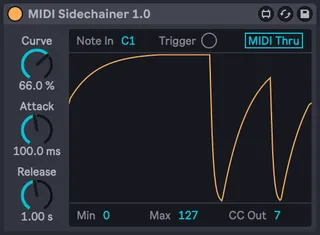
The MIDI Side Chainer is a Max for Live device designed to bring true side-chain-style ducking to external hardware synths. Instead of using audio to trigger gain reduction, the device listens for a MIDI note or trigger and translates that into real-time CC7 (volume) automation — giving hardware instruments the same pumping, rhythmic movement you’d normally only get inside Ableton.
Why this device exists??
Most analog and digital hardware synths map patch volume to MIDI CC7. In theory, that makes it possible to “fake” a side-chain effect by sending CC7 dips every time a kick, trigger, or rhythmic note occurs.
But in practice, it’s messy.
If you simply send CC7 dips manually:
the synth’s volume doesn’t return cleanly to its previous value multiple incoming MIDI messages can leak through to the synth the dynamics feel inconsistent and unpredictable you end up building complicated filter chains just to keep unwanted notes out
This device was created to solve all of those problems in one simple, musical tool.
What it actually does...
When a MIDI note (from a kick, a drum trigger, or any clip you choose) hits the device, it:
Ducks your external synth’s volume down to a defined minimum (via CC7).
Releases back up to your synth’s actual live volume, not a fixed value.
Repeats this continuously, acting like a classic side-chain compressor — but purely in MIDI.
It runs on four essential controls:
Attack – how quickly the volume dips
Release – how smoothly it returns
Min – how deep the duck goes
Max – the ceiling the volume returns to
************COMPATIBILITY**********
Ableton Live 10/11/12 only.
Must own Live Suite or own Max for Live 8.1.11 and up.
How to check if it will work with your synth? CHECK THIS ->https://youtu.be/dOiNA7MOgtw