Paint a Sequence
Paint a Sequence is a simple visual and generative sequencer...
- Type
- MIDI Effect
- Author
- crispyheadfire
- Version
- 1.0
- License
- None
- Live version
- 12.0.5
- Max version
- 8.6.2
- Downloads
- 209
- Updated
- No Updates
Paint a Sequence is a MIDI Effect for Ableton Live by crispyheadfire, distributed as freeware, with no license specified by the author. It targets Live 12.0.5 and Max 8.6.2. On maxforlive.com it has 209 downloads. Published 2025-12-11. 2 user comments below.
New to Max for Live? Read what MIDI Effects do, how device licenses work, how to install a device.
Description
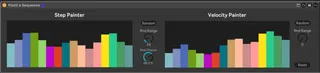
Paint a Sequence is a simple visual and generative sequencer device. Simply load the device before a MIDI instrument (or send to an external device), and draw in sequences! The step slider controls pitch, and velocity slider does what it says on the tin.
To create randomised sequences, first set the range within which to deviate (randomly). Then click random, voila!
The probability that each step will hit can also be changed using the 'Step Chance' dial.
Stuck in a creative rut? Whack on Paint a Sequence and draw out endless inspiration.
Comments (2)
One thing I noticed, though. I put a scale midi device after and the notes weren't throttled by the Scale.
It would be more powerful if it did.