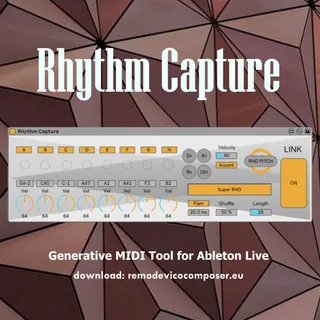
Rhythm Capture
Rhythm Capture download: https://www.remodevicocomposer.e...
- Type
- MIDI Generator
- Author
- RemoDeVico
- Version
- 1.0
- License
- Commercial
- Live version
- 10.1
- Max version
- 8.0.4
- Downloads
- 0
- Updated
- No Updates
Rhythm Capture is a MIDI Generator for Ableton Live by RemoDeVico, distributed as a commercial (paid) device. It targets Live 10.1 and Max 8.0.4. Published 2025-12-29. 2 user comments below.
New to Max for Live? Read what MIDI Generators do, what the Commercial license means, how to install a device.
Description
Rhythm Capture
download: https://www.remodevicocomposer.eu/maxforlive/rhythm-capture/
Generative MIDI Tool for Ableton Live
programmed by Remo De Vico
#musicproducer #ableton #music #drums #midi #maxmsp #maxforlive #sound #sounddesign
Rhythm Capture contains 8 independent MIDI generators.
Their simultaneous overlap allows the creation of potentially infinite random rhythmic sequences.
The internal algorithm counts from 1 to 32 bars, triggering individual MIDI notes with a 10% probability.
This approach generates ever-changing patterns while maintaining a coherent structure over time.
Note Control
It is possible to change the pitch of all instruments using the RND PITCH button.
Alternatively, notes can be assigned manually via MIDI.
The Super RND button allows the note to change at every bar.
Thanks to these features, the instrument can be used in two main modes:
Drum mode
Each MIDI note controls a different sample.
Single instrument mode
The random algorithm makes the instrument effective even on a single sound, transforming it into a kind of melodic/rhythmic generator.
Rhythmic Structure
4 different time scans.
Shuffle support.
Ability to use all 8 MIDI notes or select only the desired ones.
Dynamics
Global dynamics control.
Per-note dynamics control.
Saving MIDI Sequences
To save the generated sequences:
Insert a new MIDI track in Ableton Live.
Arm it for recording.
In MIDI FROM, select the track where Rhythm Capture is loaded.
In this way, you can record and preserve the generated MIDI material.
check out my music on
https://www.remodevicocomposer.eu
Comments (2)