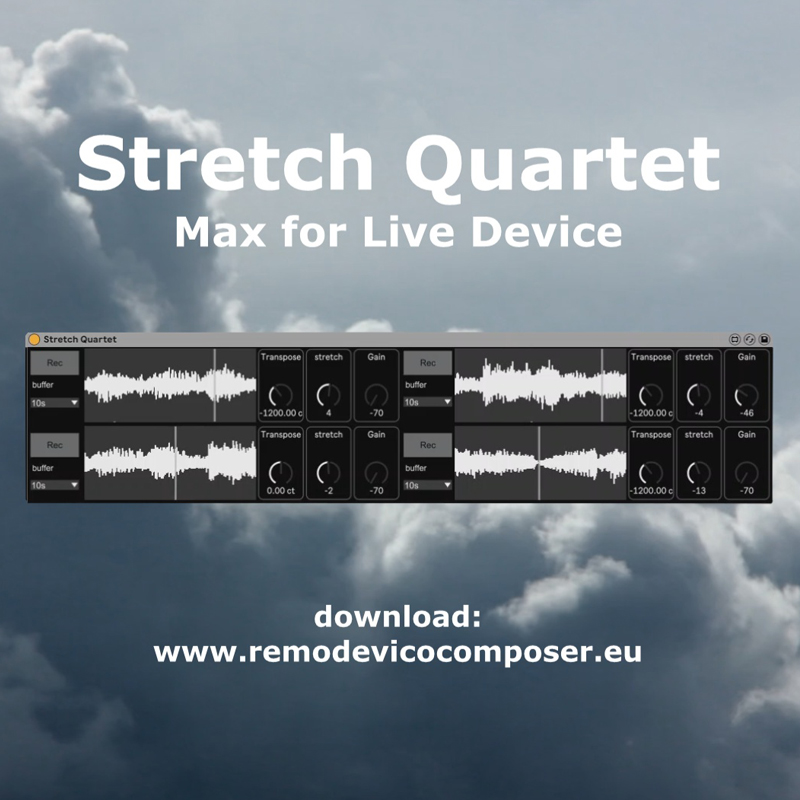
Stretch Quartet
Stretch Quartet download: https://www.remodevicocomposer....
- Type
- Audio Effect
- Author
- RemoDeVico
- Version
- 1.0
- License
- Commercial
- Live version
- 10.1
- Max version
- 8.0.4
- Downloads
- 0
- Updated
- No Updates
Stretch Quartet is an Audio Effect for Ableton Live by RemoDeVico, distributed as a commercial (paid) device. It targets Live 10.1 and Max 8.0.4. Published 2026-01-15. 2 user comments below.
New to Max for Live? Read what Audio Effects do, what the Commercial license means, how to install a device.
Description
Stretch Quartet
download: https://www.remodevicocomposer.eu/maxforlive/stretch-quartet/
programmed by Remo De Vico
#ableton #abletonlive #sound #sounddesign #texture #computermusic #electronicmusic #musicproducer #music #maxforlive #maxmsp
Stretch Quartet is an audio effect for Ableton Live
dedicated to time-stretching techniques.
It provides four independent buffers where you can record audio sequences ranging from 2 to 60 seconds, simply by clicking the Off / Rec button.
Each recorded sequence becomes an autonomous temporal layer with its own set of controls.
For every buffer you can adjust:
Pitch, from –48 to +48 semitones
Time-stretch playback speed, with negative values playing in reverse and positive values preserving forward time
Gain, allowing precise control over the balance between the four sequences
Stretch Quartet features five stereo outputs:
one master output containing the full mix,
and four dedicated outputs, one for each buffer.
This routing system allows you to build custom effect chains per sequence and to manage spatialization with great precision.
Stretch Quartet is a powerful tool for transforming a single sound into evolving textures
check out my music on
https://www.remodevicocomposer.eu/
Comments (2)
A question:
"Stretch Quartet features five stereo outputs: one master output containing the full mix and four dedicated outputs, one for each buffer":
How to access the individual outputs in Ableton Live 12.3 so that I could send them to different outputs/sends?
It would be great to have:
- a panorama option per track
- higher resolution of the transpose knobs for slight out of tune effects.
- the transpose knob(s) should change in chromatic steps when holding shift on the keyboard.
- better quality of the time stretching! or even better: let me choose from different qualities/artefacts.
- a selectable fade out time when switching off the recorded sample (per track or global)
Thanks a lot and many greetings from hamburg
;-)