Shimmer Reverb
Reverb Shimmer is a Max for Live audio effect designed for s...
- Type
- Audio Effect
- Author
- wolimsound
- Version
- 1.0
- License
- None
- Live version
- 12.0.5
- Max version
- 8.6.2
- Downloads
- 116
- Updated
- No Updates
Shimmer Reverb is an Audio Effect for Ableton Live by wolimsound, distributed as freeware, with no license specified by the author. It targets Live 12.0.5 and Max 8.6.2. On maxforlive.com it has 116 downloads. Published 2026-01-12.
New to Max for Live? Read what Audio Effects do, how device licenses work, how to install a device.
Description
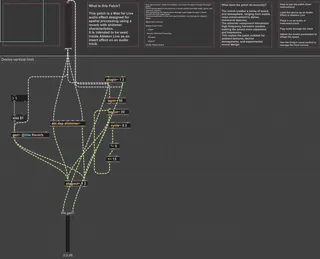
Reverb Shimmer is a Max for Live audio effect designed for spatial processing and atmospheric sound design.
The device processes incoming audio from Ableton Live by applying a reverb with shimmer characteristics, adding depth, width, and harmonic richness to the signal.
Audio enters the device from Ableton Live through the plugin~ object.
The incoming signal is processed by a reverb and shimmer module, which alters the spatial and harmonic qualities of the sound.
After processing, the signal passes through a gain stage (live.gain~) that controls the final output level.
The processed signal is then sent back to Ableton Live via the plugout~ object.
How to Use the Patch:
Load the device as an Audio Effect in Ableton Live
Place it on an audio or instrument track
Play audio through the track
Adjust the reverb and shimmer parameters to shape the sound
Use the output level control to manage volume and avoid clipping
Intended Use Cases:
Ambient and atmospheric textures
Techno and electronic music sound design
Spatial enhancement of drums, synths, and effects