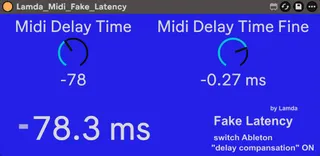
Lamda Midi Fake Latency
This tool can manualy correct generated latency after sendin...
- Type
- MIDI Effect
- Author
- MrLamda
- Version
- 0.92
- License
- AttributionNonCommercialShareAlike
- Live version
- 12
- Max version
- 9.0.10
- Downloads
- 73
- Updated
- 2026-03-14
Lamda Midi Fake Latency is a MIDI Effect for Ableton Live by MrLamda, distributed as Creative Commons Attribution-NonCommercial-ShareAlike. It targets Live 12 and Max 9.0.10. On maxforlive.com it has 73 downloads. First published 2026-03-08, last updated 2026-03-14.
New to Max for Live? Read what MIDI Effects do, what the AttributionNonCommercialShareAlike license means, how to install a device.
Description
This tool can manualy correct generated latency after sending midi data (e.g. send transport or midi notes to an external hardware synthesizer, to another midi track or to an audio track (for recording) after an instrument ). After the (manual) correction, the following recordings are on the grid.
This tool has the advantage over Ableton's onboard options that it can be saved in individual track templates (e.g., a template for recording a specific hardware synthesizer) or in an audio rack. Ableton itself always "forgets" the settings when loading or copying saved templates in its onboard settings. I also had some problems with the Ableton tools (external audio or external instrument) that generate some wired, unpredictable additional latency.
Furthermore, i also got wired problems if i try to use the Ableton midi port driver correction (options), the first recorded note was allways cutted by some ms, the following notes was then somehow correct on the grid. But also port correction allways affect all 16 midichannel, the tool is affected only the midi track with the tool.
Instructions: The tool is placed on a midi track. All following actions (send to hardware, send to a audio recording track, send to another midi track) than are corrected. Midi recordings (on the same track of tool) are not affected.
It only works if you switch the "delay compansation" ON (at the Ableton options)
Note: This tool is designed for static use; dynamic modulation will result in dropouts.