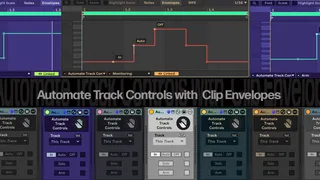
Automate Track Controls
Automate Track Control with Clip Envelopes Summary:...
- Type
- MIDI Effect
- Author
- electro666
- Version
- 1.0
- License
- Commercial
- Live version
- 12.0.5
- Max version
- 9.0
- Downloads
- 0
- Updated
- 2026-04-17
Automate Track Controls is a MIDI Effect for Ableton Live by electro666, distributed as a commercial (paid) device. It targets Live 12.0.5 and Max 9.0. Published 2026-04-17.
New to Max for Live? Read what MIDI Effects do, what the Commercial license means, how to install a device.
Description
Automate Track Control with Clip Envelopes
Summary:
Since this device utilizes the V8 Javascript Engine, it is necessary to be running Max 9.0 or higher.!
This device can be placed in any MIDI Track and used to control parameters in any track except Returns or Main track.
The parameters it can control are listed below.
- Monitoring: In, Auto, Off
- Solo: On, Off
- Arm: On, Off
Simply toggle on the parameters you wish to control and then create a MIDI clip in the same track as the device. Once toggled on, the parameters will become available in the Envelope tab of the clip editor. Then select a track to control and play the clip with the automations.
If you want to disable the automations, you can simply toggle off the parameters and that will stop them from affecting the chosen track. Even though the parameter buttons continue to change with the automations, they will no longer affect the state.
Additions
This will work when placed in a group and targeting tracks outside a group, in addition to working on Tracks inside groups when placed outside the group.
The Solo parameter works on Group Tracks
Limitations:
Only functions with Clip Envelopes, the buttons are non functional.
If parameter is disabled automations are disabled even though they may look effected.
Does not control Return Tracks, or Main Tracks.
None of the parameters are mappable.