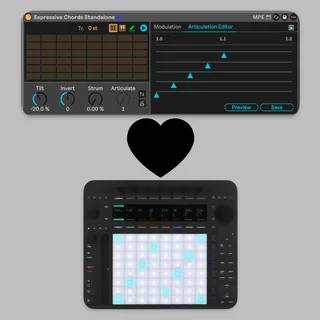
Expressive Chords Standalone
What's New This update adds two new Push 3 control pages...
- Type
- MIDI Effect
- Author
- Oddeo
- Version
- 1.0
- License
- None
- Live version
- 12.0.5
- Max version
- 8.6.2
- Downloads
- 0
- Updated
- 2026-04-14
Expressive Chords Standalone is a MIDI Effect for Ableton Live by Oddeo, distributed as freeware, with no license specified by the author. It targets Live 12.0.5 and Max 8.6.2. Published 2026-04-14.
New to Max for Live? Read what MIDI Effects do, how device licenses work, how to install a device.
Description
What's New
This update adds two new Push 3 control pages to the Expressive Chords device, giving you hands-on access to features that previously required mouse interaction. And, yes, it works in standalone mode.
New Push Page: Timing
Access this page by navigating to the Modulation tab on Push and scrolling to the Timing page (page 5, after the Articulate page).
The Timing page provides direct encoder control over note timing offsets for each voice in a chord. This lets you add humanization or deliberate strum-like timing effects without leaving Push.
How to use:
Select an articulation preset using the Articulate page on the Modulation tab.
Navigate to the Timing page.
Dial in timing offsets for each note voice. Higher values push the note later in time.
To save your changes into the current preset, turn the Save encoder to "Save."
New Push Tab: Custom Chords
Access this page by pressing the device name on Push 3 and selecting the Custom Chords tab (the third tab, after Main and Modulation).
This tab gives you direct Push control over the chord learning, copying, transposing and clip import features, all without touching the mouse. It also contains a preset selection option, which expands on the great work Tobi from AbletonDrummer.com did on his Advanced Expressive Chord device, where he added the ability to load all of the pack chord sets using a drop-down. Now you can load them using an encoder. A big thank you to Tobi for his work and for agreeing to include his functionality in this device.
Encoders:
Learn
Toggles chord learn mode. When set to "Learn," the pad layout switches to a note input grid so you can define custom chords by playing notes. Set back to "Save" when finished.
Values: Save / Learn
Chord Copy
Copies the currently selected chord slot so you can paste it into another slot. Turn to "Copy" to grab the chord, select a new slot, then turn to "Paste" to place it.
Values: Paste / Copy
Transpose -
Transposes the selected chord down by one semitone each time you toggle to “Down,” then back up to "Save.”
Values: Save / Down
Transpose +
Transposes the selected chord up by one semitone each time you toggle to "Up,” then back up to "Save.”
Values: Save / Up
Presets
Scroll through all 59 built-in chord presets (90's R&B, Jazz, Neo Soul, Pop Piano, etc.) plus 5 user slots. Selecting a preset loads its chord set immediately.
Values: Scrollable list
Import
Imports chords from the currently selected MIDI clip in your Ableton session. Turn to "Import" to load the clip's chords into the device,” then back up to "Save.”
Values: Save / Import
Compatibility
- Requires Push 3 (works in Standalone)
- Built for Ableton Live 11+ / Max 8.6+
- All existing features, pad layouts, and modulation pages are fully preserved