AZ Doppler-to-Midi
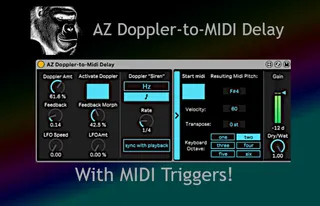
Put this device on an audio track, activate the Doppler effe...
- Type
- Audio Effect
- Author
- affezwei
- Version
- 1.0
- License
- None
- Live version
- 11
- Max version
- 8.6.5
- Downloads
- 0
- Updated
- 2026-05-11
AZ Doppler-to-Midi is an Audio Effect for Ableton Live by affezwei, distributed as freeware, with no license specified by the author. It targets Live 11 and Max 8.6.5. Published 2026-05-11.
New to Max for Live? Read what Audio Effects do, how device licenses work, how to install a device.
Description
Put this device on an audio track, activate the Doppler effect, and choose its rate according to the “Siren” parameters. If you want to send out the delayed pitches as midi, select Start Midi and choose your keyboard octave and other parameters. The midi from this device should be visible on any midi track, just select AZ Doppler-to-Midi as your midi source. This device will not take midi input, only send it out.
This is an audio effect that delays incoming audio. Its delay can mimic the doppler effect heard in old-fashioned police siren sounds and take them to extremes in order to create or generate melodic material. The pitches from this effect can be converted to Midi information that can be received on any Midi-track within Ableton or to external hardware by using Ableton’s External Instrument object. AZ Doppler-to-Midi Delay was inspired by the patching found in "Generating Sound and Organizing Time" (https://cycling74.com/books/go) copyright Gregory Taylor and Graham Wakefield.
Read the full manual: https://docs.google.com/document/d/1OVZs2Bpg1QWmK29EugjebsAtBEXeJjXBazQqJ8rFZcE/edit?usp=drive_link