MidiShaperExpCtrl
Using the Expression Control patch as a template, I have cre...
- Type
- MIDI Effect
- Author
- asylumsp
- Version
- 1.0
- License
- None
- Live version
- 9.0.1
- Max version
- 6.1
- Downloads
- 683
- Updated
- 2013-03-21
MidiShaperExpCtrl is a MIDI Effect for Ableton Live by asylumsp, distributed as freeware, with no license specified by the author. It targets Live 9.0.1 and Max 6.1. On maxforlive.com it has 683 downloads. Published 2013-03-21. 3 user comments below.
New to Max for Live? Read what MIDI Effects do, how device licenses work, how to install a device.
Description
Using the Expression Control patch as a template, I have created a helper MIDI patch for using Cableguys MIDI Shaper plugin.
Using this plugin is similar to the structure explained by Cableguys whereas you need 2 MIDI tracks to use their plugin. Using this M4L device eliminates the need for using IAC Midi which was a pain to use the MIDI learn for mapping controller channels.
To use MIDI shaper to control say the EQ Eight, this is how you would set it up:
1) create a midi track that has your clips or midi data. On this track instantiate MIDI Shaper. All midi that drives whatever you want to control with MIDI shaper will come from this track. This includes note data and controller data. Basically, it will all get merged by the MIDI shaper on this track. You have to use the VST version for all this to work.
2) On a second track, create your virtual instrument and and effects. Also, create a copy of MidiShaperExpCtrl. On this track, set the midi input from the other track, and the source to be the midishaper. set the track to IN.
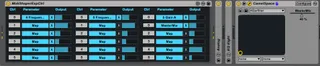
Now play midi from the first track and make changes in the midi shaper. You'll need to set the output matrix in midi shaper. In the MidiShaperExpCtrl, click on 'Map' and select a parameter. For any parameters in a 3rd party VST/AU, remember to map them into ableton. In the picture included, you can see that I mapped MasterMix from CamelSpace so that column3 param 0 is driving it from CC#0.
Comments (3)
Please help, this is exactly what I'm looking for.
http://i.imgur.com/E7svslx.png