Push Rack Omnisphere 3. All factory presets
https://youtu.be/lVqVFutdUP0 Browse and play every Om...
- Type
- Instrument
- Author
- adamrouge
- Version
- 1.0
- License
- Commercial
- Live version
- 12.0.5
- Max version
- 8.6.2
- Downloads
- 0
- Updated
- 2026-06-28
Push Rack Omnisphere 3. All factory presets is an Instrument for Ableton Live by adamrouge, distributed as a commercial (paid) device. It targets Live 12.0.5 and Max 8.6.2. First published 2026-06-24, last updated 2026-06-28.
New to Max for Live? Read what Instruments do, what the Commercial license means, how to install a device.
Description
https://youtu.be/lVqVFutdUP0
Browse and play every Omnisphere 3 factory preset directly from Ableton Push — no mouse, no menus, just music.
What's included :
Over 35,000 Instrument Racks covering the complete Omnisphere 3 factory library, organized across all 21 banks:
Ambient Dreams · Analog Vibes · Atmosphere Library · Classic Digital · Club Land · Electronic Production · Electronic Underground · Experimental Organic · Hard Edges · Hardware Library · Instruments Collection · Live Keyboardist · Omnisphere Library · Organic Vibes · Retro Vibes · Scoring Electronic · Scoring Organic · SFX Electronic · SFX Organic · Spotlight EDM · Vocal Collection · Warm Tones
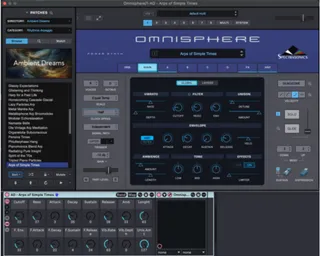
Every folder is organized by Bank → Category → Subcategory, mirroring Omnisphere's own browser structure, see example images on Ambient dreams on pictures.
Each rack includes 16 macro knobs pre-mapped to the most expressive parameters of the main panel :
F. Cutoff, F. Resonance, F. Envelope, Amplifier ADSR, Filter ADSR, Ambience & Ambience Length, Vibrato Rate & Depth, Unison Amount.
Why this exists
Omnisphere is one of the most powerful instruments ever made. But if you work with Ableton Push, you already know the problem: third-party VSTs don't integrate with Push's preset browser. You can't scroll through patches, you can't browse by category, and you can't perform with knobs — unless you've mapped everything yourself.
This pack solves that. Every factory preset becomes a native Ableton device, browsable and playable from Push like any built-in instrument.
Requirements
Ableton Live 11 or higher
Omnisphere 3 (Spectrasonics) — full installation required
Ableton Push (any generation) — recommended, not required
Installation
Drop the folder into your Ableton User Library, ableton will index everything automatically.
Add the folder to the Places section. Open Push, navigate to your User Library, and every preset is there.
This pack contains Ableton Instrument Rack files (.adg) only. Omnisphere and its sounds are not included and must be purchased separately from Spectrasonics.