Quantized FX Solo Mute Switch M4L
Quantized FX Solo Switch is a small Max for Live utility for...
- Type
- Audio Effect
- Author
- laihoz
- Version
- 1.0
- License
- AttributionNonCommercial
- Live version
- 12.3
- Max version
- 9.0.9
- Downloads
- 69
- Updated
- 2026-07-06
Quantized FX Solo Mute Switch M4L is an Audio Effect for Ableton Live by laihoz, distributed as Creative Commons Attribution-NonCommercial. It targets Live 12.3 and Max 9.0.9. On maxforlive.com it has 69 downloads. First published 2026-07-05, last updated 2026-07-06.
New to Max for Live? Read what Audio Effects do, what the AttributionNonCommercial license means, how to install a device.
Description
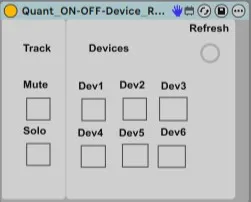
Quantized FX Solo Switch is a small Max for Live utility for Ableton Live 12.
It lets you turn another Ableton device on/off, solo tracks, or mute tracks in sync with Live’s musical grid, instead of switching immediately when you press a button.
Honestly, it is kind of amazing that Ableton does not already have this by default. We can quantize clips, warping, automation, probably our life decisions at this point… but not a simple device on/off button, solo or mute? Anyway, here we are.
It is especially useful for:
- Beat Repeat
- Echo
- Reverb
- DJ-style FX builds
- Live performance racks
- RMX-style transitions
Instructions:
- Put the M4L device on the track where you want to control FX, solo, or mute actions.
- Once it is loaded, turn on the M4L device and press Live’s global Play button so the internal quantized timing starts running.
- Press any button on the device and it will turn the selected target device on/off, mute, or solo in sync with the chosen quantization.
- Device targets follow the original device order from when the M4L device was loaded/refreshed.
- Be careful not to target this M4L device itself, because it will turn itself off. Yes, it can defeat itself. Very dramatic.
- If the device order changes, or if you add a new device in between, press the “Refresh” button to update the targets.
- Map these buttons to a MIDI controller and have fun 😉
Hope this helps someone out as much as it helped me!
If this saved your build-up from falling apart, or from one badly timed Beat Repeat disaster you can buy me a coffee or leave a small donation. No pressure — the device will still quantize either way ☕😉 https://ko-fi.com/laihoz
Please let me know if it worked correctly and if there is anything you are missing 👍