- Type
- MIDI Effect
- Author
- Jkamata
- Version
- 1.0
- License
- None
- Live version
- 9.0.1
- Max version
- 6.1
- Downloads
- 479
- Updated
- No Updates
Six-trak controller is a MIDI Effect for Ableton Live by Jkamata, distributed as freeware, with no license specified by the author. It targets Live 9.0.1 and Max 6.1. On maxforlive.com it has 479 downloads. Published 2013-04-07. 3 user comments below.
New to Max for Live? Read what MIDI Effects do, how device licenses work, how to install a device.
Description
Hi Folks
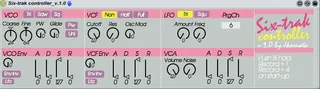
So I just made this Sequential Six-trak controller. It's based on the controller already made by 'lem' - but prg chng, and a decent mapping is missing- so i just kinda improved it a bit to my own satisfaction - inna 70's-80's way :)
Enjoy!
Comments (3)
But what about the automoation for the multiple on-off type switches, like the different waveforms, lfo on, env inverts, and unison switches? They work, but they're not available for automation.
I know nothing about max and how to do that, but I know I've done it in the six-trak controller I made through FruityLoop's "Dashboard"...so I would assume its something possible here too (???)
Thanks!
But... a "Send ALL parameters" button would be extremely useful ..?
And... I can automate one parameter fine, but if automate another then the first stops working - it's like there's a midi CC limiter on it making it only possible to send one stream of CC data at a time, is that normal? Example: automate the pulseWidth to get a bpm synced PWM effect; then also automate filter cutoff movements and the PWM stops working :(