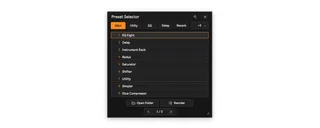
Preset Selector
Launch your favorite Ableton Live and plug-in presets from o...
- Type
- Audio Effect
- Author
- ym522ml
- Version
- 1.0.0
- License
- Commercial
- Live version
- 12.4.3
- Max version
- 9.1.4
- Downloads
- 0
- Updated
- 2026-08-05
Preset Selector is an Audio Effect for Ableton Live by ym522ml, distributed as a commercial (paid) device. It targets Live 12.4.3 and Max 9.1.4. First published 2026-07-16, last updated 2026-08-05.
New to Max for Live? Read what Audio Effects do, what the Commercial license means, how to install a device.
Description
Launch your favorite Ableton Live and plug-in presets from one compact, resizable selector.
Full Description
Preset Selector is a Max for Live audio device that turns a focused folder of presets into a fast floating launcher. Keep your most-used Live devices, racks, and plug-in presets together, organize them with folder tabs, and load any slot with a click or the number keys 1-9.
The selector opens in a compact nine-slot view and adapts as you resize it, expanding from one to three columns. Finder changes are synchronized automatically, so newly added or moved presets appear without a Refresh button. Reorder mode lets you drag presets within a page, across pages, or onto another folder tab. Folder tabs can also be reordered.
Everything required to run Preset Selector is embedded in the `.amxd` file. There is no external helper to install, no account, no network connection, and no analytics.
Key Features
- Compact, custom-drawn floating selector
- Mappable Select button for opening and closing the window
- Number-key shortcuts 1-9 and Esc close
- Automatic Finder synchronization
- First-level folders displayed as tabs
- Drag reordering within pages, across pages, and across folders
- Reorderable folder tabs
- Pin mode for keeping the selector open while auditioning presets
- Responsive one-, two-, or three-column layout
- Support for `.adv`, `.adg`, `.vstpreset`, and `.aupreset`
- Self-contained `.amxd` with no external helper installation
Requirements
- Ableton Live 12 with Max for Live
- Max 9
- Tested on macOS 14.8.7, Ableton Live 12.4.3, and Max 9.1.4
Windows code paths are included, but Windows was not physically validated for v1.0.0. Third-party presets require the corresponding plug-in. Presets and plug-ins are not included.