- Type
- MIDI Effect
- Author
- monsterkodi
- Version
- 1.2
- License
- None
- Live version
- 12.4.3
- Max version
- 9.1.4
- Downloads
- 243
- Updated
- 2026-08-02
7 Steps is a MIDI Effect for Ableton Live by monsterkodi, distributed as freeware, with no license specified by the author. It targets Live 12.4.3 and Max 9.1.4. On maxforlive.com it has 243 downloads. First published 2026-07-30, last updated 2026-08-02. 2 user comments below.
New to Max for Live? Read what MIDI Effects do, how device licenses work, how to install a device.
Description
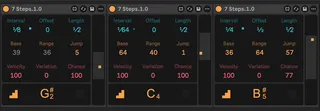
A MIDI note generator
Use cases:
Scan samples in a Simpler or a set of drums in a Drum Rack.
Quickly generate simple percussion or bass lines.
With parameter automation you can even create pretty wild melodies ;)
Neat features:
Note out and trigger interval grid displays.
Global mute and solo functionality over all 7 Steps devices.
Scale aware stepping.
Requires Live version 12.
In case you give it a try and it doesn't work, please let me know!
Have fun!
---
v1.1 - fixed note display showing wrong notes
v1.2 - scale aware mode. note accurate range display.
Comments (2)
INTERVAL, OFFSET AND LENGTH can't be adjusted on Live 11 Suite.
Maybe it requires latest 12 and max. :/
thanks a lot for reporting this. i updated the readme that version 12 is required.
i am sorry that it doesn't work for you.
i did some weird stuff in order to get human readable fractions displayed that are also modify-mappable.
if you wouldn't mind you could test something: open the max patch and move the top three value displays down a bit to reveal the actual number inputs below.
my hunch is that the click-through feature might not work in 11.