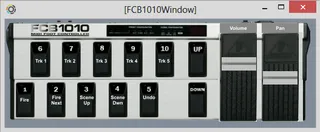
FCB1010 Looper control
The idea is to select a track (1-5) for recording using butt...
- Type
- MIDI Effect
- Author
- DLWhite
- Version
- 1.2
- License
- AttributionNonCommercial
- Live version
- 9.0.4
- Max version
- 6.1.2
- Downloads
- 1,634
- Updated
- 2013-06-24
FCB1010 Looper control is a MIDI Effect for Ableton Live by DLWhite, distributed as Creative Commons Attribution-NonCommercial. It targets Live 9.0.4 and Max 6.1.2. On maxforlive.com it has 1,634 downloads. First published 2013-06-23, last updated 2013-06-24. 15 user comments below.
New to Max for Live? Read what MIDI Effects do, what the AttributionNonCommercial license means, how to install a device.
Description
The idea is to select a track (1-5) for recording using buttons 6-10.
Use button 1 for starting/stop clip record on empty clips or stop/start clip play.
Use button 2 to launch the next clip (record or play)
Buttons 3 and 4 move the scene selection up and down. Button 5 triggers undo.
V1.2 Notes
I've hooked up the Pedal Simulator and created a floating window for it so it's usable even when the track selection moves.
Note: it appears that for pictctrl that you can have a toggle that isn't perfectly square, so I haven't made the leds latching for the 5 track selectors, but that shouldn't be a problem in use.
the pan and volume are connected (respond) to the incoming physical FCB1010 expression pedals and they will directly control volume and pan. But they do not respond to direct manipulation of the live mixer controls... I'll fix that later.
V1.1 Release Notes:
This is work-in-progress patch for recording and playing loops in Ableton Live.
Only the first Patch (00) is working. Each FCB1010 Button (1-10) should be mapped to MidiNotes (0-9)
Buttons 6-10 will select Track 1-5 (respective) and exclusive (to tracks 1-5) enable record. Any other track (5 or higher) that has record enabled will remain enabled.
Buttons 6-10 will also send out a Patch Change message (0-5) to an external device. I'm using a Line6 HD 500. So this changes the patch on the HD at the same time as rec enabling the track. 5 different tracks = 5 different HD500 patches.
Button 1 fires the clip
Button 2 fires the next clip
Button 3 selects previous scene
Button 4 selects next scene
Button 5 triggers an Undo
If you open the patcher, you can see that I'm working on control over recording a track from a looper on a previous track and stopping the looper at the end of the clip record. The goal is to be able to record drums on the fly to set a loop and song tempo then record guitar tracks. I'm recording drums through a looper, then trying to put the loop in a clip. This is unfinished - it current may miss the begging or end of the loop.
I've built a nice Presentation UI of the FCB1010 with working buttons and expression pedals. It's currently not hooked to anything, but could be made to mimic the pedalboard if you wanted to wire it up that way. Or steal it for your own (attribution requested)
Comments Welcomed.
Comments (15)
I found a really cool idea, but I could not make my FCB1010 communicate with the plugin.
what I have to do?
Thank you for your attention
I'm very intersted by the evolution (with a looper to set a tempo), did you fork on it since you posted this one ?
Thanks again.
thank you for your work. The GUI works perfectly, but I can´t get the FCB to work. I´ve put it on a 6th channel, the midi-input is correct, because I can see the midi-messages coming in. It´s the first bank - the note are from 00-09 - but ....?
I would really appriciate if you could give me any advice.
regards,
Tom
I also can't get the FCB to work, cause my Note On Velocity just send's out 100. But the patch tests for 127.
@DLWhite: I can't go in edit mode on your patch. Unlock presantation mode works, but no edit. Do you know why?
Thanks,
Birk.
Did you programm with Max 5 or 6?
Just for curiosity: What do you use now for foot-control?
Cheers, Birk.
Liquidfoot
Everything works fine except for the Undo button.
I'm running Ableton Live 9.6 on a iMac.
What can be wrong?
But what I really want is to be able to Undo a recording of a clip from my FCB101.
Kent J.
I wrote a small patch which can be used with your patch, especially if people don't know how or don't want to change their FCB1010 (default) settings. It translate the PgrmChange which is sent by the FCB1010 if it is set to the factory presets (and the CC numbers of the pedals) into the right Midi Notes for your patch. Maybe you want to implement in your patch? Cheers Tobi http://www.maxforlive.com/library/device/3871/fcb1010-program-change-to-midi-notes-translator