Ultimate Ztep Zeq
NEW IN UZZ 3.2 Remove the reset bar, now automaticall...
- Type
- MIDI Effect
- Author
- animatek
- Version
- 3.2
- License
- Commercial
- Live version
- 10
- Max version
- 8
- Downloads
- 4
- Updated
- 2020-12-04
Ultimate Ztep Zeq is a MIDI Effect for Ableton Live by animatek, distributed as a commercial (paid) device. It targets Live 10 and Max 8. On maxforlive.com it has 4 downloads. First published 2013-07-02, last updated 2020-12-04. 25 user comments below.
New to Max for Live? Read what MIDI Effects do, what the Commercial license means, how to install a device.
Description
NEW IN UZZ 3.2
Remove the reset bar, now automatically the device adjust the measure of the secuence.
The menus of the direction, measure, scale have changes to umenus.
many problems with the interface have been corrected.
New animatek logo added.
The installation is now a pack that will be installed in your PLACES/PACKS
New in 3.1
General and presets improvements:
The code has been reduced by 48% and now it is super fast.
Issues in the interface have been corrected.
Now you do NOT need to use SHIFT + click to save the preset, the preset in which you are working is automatically stored when you move to the next one.
It has included an option to copy and paste the presets that make the work more fun and fast.
Compatible with Ableton Live 10 and with PUSH banks (Experimental).
--
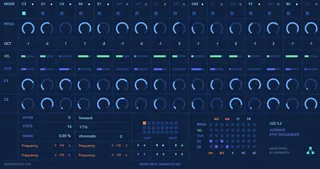
UZZ 3.1 is a step sequencer created in Max for Live for Ableton. With this device you can create amazing sequences by modifying their parameters randomly and also you can automate any parameter of Ableton using a powerful matrix of modulation device.
Step Parameters:
UZZ 3.0 is a 16-step sequencer where you can adjust each parameter in every step independently. Also, all parameters can be changed randomly with very few clicks. Awesome results really quick!!!
Mode : In this section you can see information of the corresponding step note and enable or disable the step with the cross or play button.
Pitch : Here you can change the step pitch range from 0 to 12 (full octave).
Octave : Change the octave of the step, five eights are available from -2 to 2.
Velocity : Change the range of the velocity of the step, from 0 to 127.
Duration : The duration can also be adjusted in each step, 128n, 64n, 32n, 16n, 8n, 4n, 2n.
Controls : With these two controls you can modulate any of the four maps controls or any destination using the matrix section.
Map Controls: The four controls allow you to map any parameter in your Live set. To make them work you should assign an entrance signal activating them at the Matrix modulation section.
Global Parameters:
Xpose: Xpose has two states. ON: the notes coming from a MIDI clip will be the source for the transposition, OFF: transpose the sequencer manually using the adjustable number.
Direction: The playback direction can be modified: Forward, Backward, Back and Forth, Random, Drunk.
Steps: Select the number of steps of your sequence from 1 to 16.
Quantize: Change the quantization of the sequence: 1/2, 1/4, 1/8,1/16, 1/32, Dotted and Triplets.
Swing: Activate or deactivate swing on your sequence and adjust the amount.
Scale: Select the type of scale (up to 19 different scales).
Matrix Modulation:
In this particular section of the device you can activate the incoming modulation signal from the Pitch, Velocity, Duration, and the two controls.
The parameters that can be modulated are:
The four MAP parameters (M1 to M4).
Two adjustable Controls Change (blue numbers)
Program Change (PC).
Pitch Bend (PB).
AfterTouch (AT).
With presets you can store different sequences configurations, the UZZ saves these settings automatically when you save your Live song. Do not forget to collect and save.
How does it work?
– Forget about record the presets, now they are stored in the orange box automatically.
– Now You can copy and paste the presets using the buttons!
--
TECHNICAL REQUIREMENTS
UZZ 3.1 is fully compatible with Ableton Live 10.
The device only supports Ableton Live 9 and max 7 and above
The package included live 9 and 10 compatible versions also the previous version of UZZ 2.1.amxd (Compatible with live 8 and max 6).
Comments (25)
Works wonderfully mapped to the bcr2000..
cheers
was thinking of another.
there's no right click midi learn here. is this possible ?
Do you want to map the pitch and velocity sliders?
I'll make an update in a couple of days, don´t worry!
Thanks for the support!!
especially pitch, quantization, randomize buttons.
being able to map this to the massive amount of knobs available to the bcr2000 is where its at!
how do the updates work for folks who bought it ?
fully mappable ;)
- PITCH
- VELOCITY
- DURATION
- CONTROL 1
- CONTROL 2
- QUANTISE
- QUANTISE AMOUNT
- NO. OF STEPS
- RANDOMISE BUTTONS
- and probably more i didnt spot
but id love to have midi map to MODE PLAY/MUTE and OCTAVE for each step - its either there but i dont see how to map it... clicking with mouse open submenu on MODE and OCTAVE and it doesnt let me midi map
thanks
but will look into this in few.
i use uzz with the bcr2000 as well.
I'm looking at some method for the octave too...
For the nexts updates, how do You feel the UZZ with 32steps????
cheers
https://soundcloud.com/sunfalls/rachettest
I'm sporadically having issues with stuck notes on external synths when I use the sequencer. Anyone else having this issue?
The only sequencer giving my external synths stuck notes is the Uzz. I have to power them off and on again to get them to stop.
This is everything from my Minibrute, Moog synths, and Korg synths.
Is it possible to add a panic button that would give all an notes off to the sequencer? It's very usable with soft synths, but I bought it to use with my externals.
Can you help me out?
Loving this sequencer, am planning to map it to bcr2000 soon
It seems to be messing with my undo history in live 9.1, max 6
or am I missing something?
Thanks for a great sequencer :)
Thx very much for this great sequencer.
It would be really great if the 4 Macros would have an adjustable glide parameter to get smoother parameter changes when going through the steps.
Also if Presets could be chained together would be cool.
But either way i'm pretty pleased =). Thx again.
Great idea for the glide stuff, i will implement in a future update, about the preset chain i´m thinking to create a song mode or something like that!
Thank you !! happy christmas!
how do you make the step reset and play on the 1 when you pause/play ableton???
Can reset the sequence in bars and slave to Ableton with the reset button just to the right of the direction parameter..
i purchased your device but I found some problems in Ableton 10 :
when i load the device on a track and make a change to any parameter, the ableton undo function remains locked on the change just made; after a research on the web I discovered that's a typical problem of some max for live devices. I share a link to better understand the problem :
https://forum.ableton.com/viewtopic.php?t=230968
Another problem is that when I try to make a transition from one preset to another using automations, i always hear crackle noises/audio dropouts.
It is possible to fix that?
Thanks in advance, your device is superb!
thx in advance!