- Type
- MIDI Effect
- Author
- greaterthanzero
- Version
- 1.0
- License
- None
- Live version
- 9.0.4
- Max version
- 6.1.3
- Downloads
- 451
- Updated
- No Updates
Drum Thinner is a MIDI Effect for Ableton Live by greaterthanzero, distributed as freeware, with no license specified by the author. It targets Live 9.0.4 and Max 6.1.3. On maxforlive.com it has 451 downloads. Published 2013-06-26. 2 user comments below.
New to Max for Live? Read what MIDI Effects do, how device licenses work, how to install a device.
Description
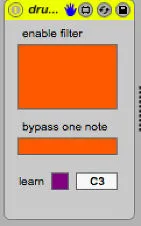
* When two or more notes are received simultaneously, this effect will randomly select one of those and filter out the rest.
* You can optionally bypass that filter for one note of your choosing (the default is C1, where we presume that your kick drum is found).
* There's a Learn button associated with that input. Press it, trigger the note you want bypassed, and the device configures itself accordingly.
(This may also usable for pitched instruments, though I've done some destructive things to the note durations, and it may not behave as you're expecting. Really, we're optimized for drums here)
Comments (2)
does it introduce latency?
thanks
For a MIDI drum track, that difference shouldn't be perceptible, but if you're using those midi notes to trigger audio effects, it won't be considered sample-accurate timing.
...but as I noticed your question a full year after you asked it, you've probably evaluated for yourself by now.