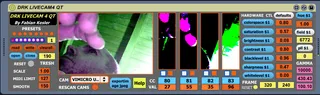
DRK LIVECAM4 QT Quick Time version
THIS IS THE QUICK TIME VERSION OF DRK LIVECAM4, AIMED MOSTLY...
- Type
- MIDI Effect
- Author
- DrKesler
- Version
- 1.0
- License
- AttributionNonCommercial
- Live version
- 9.0.4
- Max version
- 6.1.2
- Downloads
- 1,922
- Updated
- 2013-08-07
DRK LIVECAM4 QT Quick Time version is a MIDI Effect for Ableton Live by DrKesler, distributed as Creative Commons Attribution-NonCommercial. It targets Live 9.0.4 and Max 6.1.2. On maxforlive.com it has 1,922 downloads. First published 2013-06-27, last updated 2013-08-07. 11 user comments below.
New to Max for Live? Read what MIDI Effects do, what the AttributionNonCommercial license means, how to install a device.
Description
THIS IS THE QUICK TIME VERSION OF DRK LIVECAM4, AIMED MOSTLY TO MACINTOSH USERS.
I HAVE CHANGED MANY THINGS TO MAKE IT WORK WITH QUICK TIME VIDEO OBJECT, AS IT HAS VARIOUS DIFFERENT CHARACTERISTICS AND MESSAGES TO DIRECT X OBJECT VERSION. SO I INVESTIGATED IT AND DID IT, AS SOME OF YOU TELL ME ABOUT USING LIVECAM4 IN MAC. HERE IT IS : )
add: THE STAND ALONE VERSION FOR MAC IS THE .MXF FILE. SEE LINKS BELOW
FOR USING IN PC WITH WINDOWS (but remember that the previous version of DRK LIVECAM4 already uses native Windows Direct-X object):
YOU HAVE TO INSTALL FULL VERSION OF QUICK TIME 7 OR LATER
DOWNLOAD AND BUY THE FULL VERSION HERE
http://www.apple.com/es/quicktime/download/
YOU HAVE TO INSTALL WINVDIG. (I tested versions and 1.01 work better than 1.05. I recommend to fully uninstall previous version of WinVDig and the install 1.01. Download and tips for Windows 7 links here:
http://www.eden.net.nz/7/20071008/
http://forum.processing.org/topic/how-to-get-vdig-working-in-windows-7
DRK LIVECAM4 (Max version for PC, look for Quick Time version in my other plugins to use with MAC) transforms your camera into a 4 continuous midi sensor-controller.
Useful for:
- Musicians who want to explore in real-time, interactive multimedia, with a kind of light & movement sensor-instrument
- Dancers and performers who dont want to depend on a pre-recorded cd, and prefere to making and/or to processing the music alive
As they want, "when" they want, getting so more freedom, surprise and a more lively and integrated situation on scene.
- Interactive instalations where the people that participates can generate or process the music as they walk on it.
All with a simple and cheap web cam...(or any cam recognized by the computer)
How does it works?
The frame area of the drk livecacam4 is virtually divided into 4 zones and each zone correspond to a midi controller when livecam translates the luminance (direct and-or by reflection) to midi values.
Every enough iluminated object works: faces, objects, fixed surfaces...to more luminance corresponds greater midi value.
Some clothes reflectes very well the light, the human skin and hair does, some surfaces and materials....i´ll suggest you to try.
It is better for the captation to work with good contrast: in some darkness and with some iluminated objects or persons to have a lineal behaviour but of course you can experiment with the light conditions.
Also may be interesting for experiment to move the camera, capting different quiet ambient objects like walls, furniture, etc.
Giving so movement to the quietness and translating the results to musical aspects that you decide.
It is very interesting and precise to work with lanterns, better small-led ones.....you control the midi value with the distance between the camera and the lantern.
VIDEO: http://youtu.be/sRde_AXXsFM (DX version but similar to this QT version)
MORE VIDEOS, HELP, ABLETON TEMPLATE, STAND ALONE (MXF) AND MAX VERSION HERE:
http://fabiankesler.blogspot.com.ar/p/max-msp.html
Author: Fabian Kesler - [email protected]
Comments (11)
That is with max 6.13 on a mbp late 2012 running 10.8.4.
By te way, do you have the last Quick Time full version? I dont know if it comes inside Mac OS...
Greets, and let´s try to solve it!.
DRK LIVECAM4 works great on my MacBookPro. I think this is a great tool for dance-music performances. I am a dance class accompanist for 18 years and compe music for contemporary dance and was looking for a tool like this. I am very new to Max so I do not know how to alter or add things. So I have some questions and ideas; Can I use a pre-recorded video on this device? it will be very good for exploring ideas and sounds at home. dividing screen for different cc messages is a very good idea. Is it possible to divide the screen in a different way? for example diagonally or draw custom areas, circles triangles etc. I also wonder if color changes can be used as cc messages? I tried using two DRKLIVECAM in different midi tracks and in different midi channels they both worked I managed to control 8 parameters but not perfectly. there was a flicker at the image and the values were not smooth. Is it possible to use 2 or more DRK LIVECAM simultaneously. Is it also possible to use 2 or more cameras?
Anyway I appreciate your work a lot. It is easy to use and reliable instrument as far as I experienced. I wish I had enough knowledge in programing Max in order to contribute your project.
thanks a lot
thanx a lot- great device!!
do you see any possibility to define a track as input?
this way i could use a film i am working on in ableton as
controller... that´d be fantastic!!!
greetings!